
Calculate the ideal GPU for LLM deployment by summing up two memory values. The weights set the minimum value, while the KV cache, along with your concurrency, determines the actual number.
The weights of a 70B model in FP16 require 140 GB of memory. This implies a minimum of two 80 GB GPUs and typically more, three or four when you account for cache and other requirements.
This guide covers the math behind this and evaluates the cost of running four different models on rented H100s. The cost estimates are based on the prices on provider websites as of October 9, 2026.
Last updated: October 13, 2026. Sizes are in decimal gigabytes.
The AI Compute Threshold Report
We analyzed pricing from 150+ GPU cloud providers to find the exact threshold where an AI startup's OpenAI API bill eclipses the cost of a dedicated H100 cluster.
Read the Full ReportCost estimates in USD are based on ₹96.435 to one US Dollar, the RBI reference exchange rate on October 6, 2026. Rental costs exclude GST, egress, and storage.
Key takeaways
- The correct GPU for LLM serving begins with memory requirements. Memory weights are parameter counts multiplied by bytes per parameter. A 70B model requires 140 GB in FP16, 70GB in FP8, and about 35 GB in 4-bit.
- KV cache size increases with each token served. Llama 3 70B uses up 2.7 GB for each sequence of 8,192 tokens.
- Training uses around 16 bytes per parameter without activations. This is eight times just the FP16 weights.
- In-memory does not mean good serving performance. Memory bandwidth and batching determine throughout.
- First, rent the GPU and measure the throughput with your own data. A 70B model on 2 H100s costs about ₹3.7 lakh per month at E2E’s published rates.
Training, fine-tuning and inference need different GPUs
Workload is what you should name before you estimate anything. The same model will require completely different memory for each one.
During inference, the system will load weights and hold a KV cache for each active query. The memory footprint will grow proportionally to concurrency and context size.
Fine-tuning requires gradients and optimizer states. Parameter-efficient methods like LoRA significantly reduce that overhead. Our tutorial on fine-tuning LLMs explains those methods in detail.
Training from scratch implies the whole memory overhead and multi-GPU training. Our tutorial on the best GPUs for training LLMs makes a comparison.
In this article, we focus on the GPU for LLM serving and explain why training goes so far beyond it.
How much VRAM do model weights need?
It all begins with the most straightforward calculation. Weight memory is the number of parameters times the bytes per parameter.
For FP16 and BF16, each parameter uses 2 bytes. Each parameter uses 1 byte for FP8 and INT8. For 4-bit quantisations, it’s a half-byte.
Hugging Face’s Llama 3.1 Release Notes contain the FP16 sizes of the models. 8B will use 16 GB, 70B will require 140 GB, while 405B will require 810 GB.
| Model size | FP16 / BF16 | FP8 / INT8 | 4-bit |
|---|---|---|---|
| 7B | 14 GB | 7 GB | 3.5 GB |
| 8B | 16 GB | 8 GB | 4 GB |
| 13B | 26 GB | 13 GB | 6.5 GB |
| 34B | 68 GB | 34 GB | 17 GB |
| 70B | 140 GB | 70 GB | 35 GB |
| 405B | 810 GB | 405 GB | 202.5 GB |
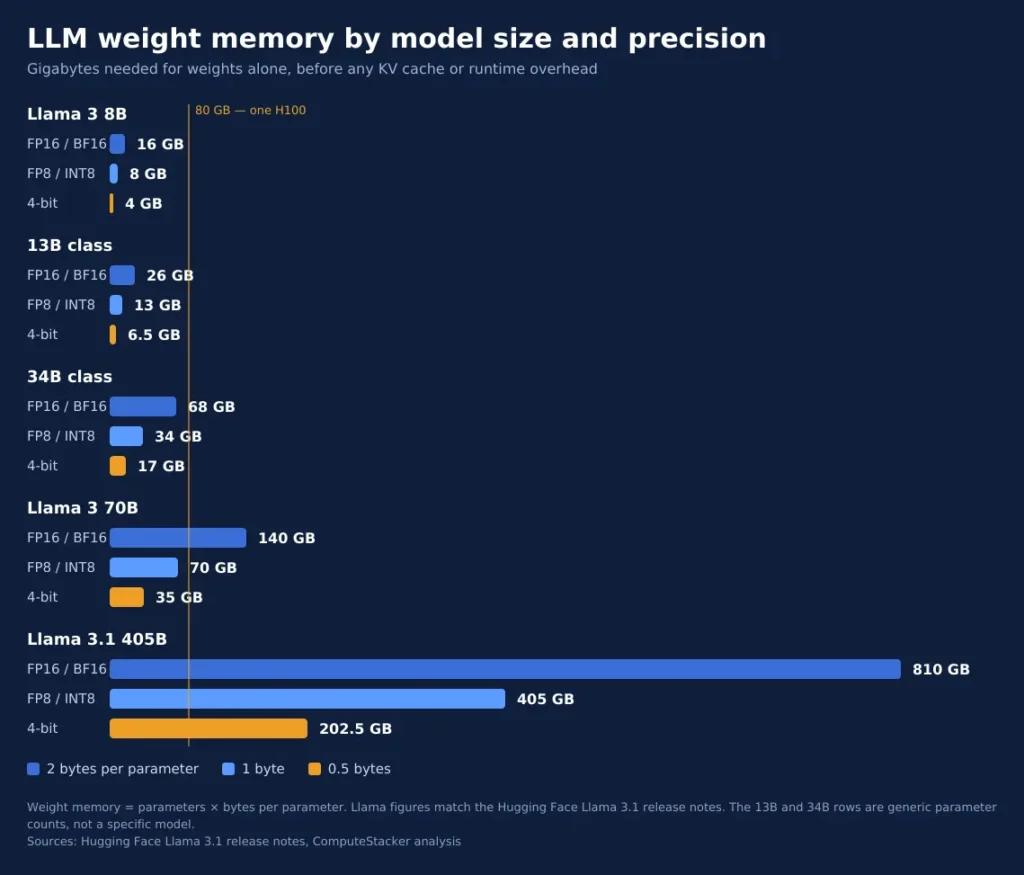
Think of them as the floor requirement for any GPU that you’re planning to use for LLM deployments. They’re actually even higher, as weight memory is just one of the memory requirements.
Quantisation also requires you to sacrifice some accuracy for space. Check the performance on your prompts at lower precisions before committing to reduced GPUs.
The context length is just as important as the precision. If a model copes well with 8,192 tokens, then you can still encounter memory issues with 32,768.
What else uses GPU memory?
The KV cache, the runtime, and your headroom lie stacked on top of the weights.
The KV cache
Every processed token contributes a key and a value vector in each layer. The model caches them to avoid computing the vectors for previous tokens.
KV cache size is given by a straightforward formula:
KV cache bytes = 2 × layers × KV heads × head dimension × tokens × bytes per element
The 2 is for keys and values. Since Llama 3 utilizes grouped-query attention, all three sizes contain 8 KV heads with a head dimension of 128. The number of layers depends on Table 3 of the Llama 3 paper.
| Model | Layers | KV bytes per token (FP16) | KV per 8,192-token sequence |
|---|---|---|---|
| Llama 3 8B | 32 | 131,072 | 1.07 GB |
| Llama 3 70B | 80 | 327,680 | 2.68 GB |
| Llama 3.1 405B | 126 | 516,096 | 4.23 GB |
These numbers are the results of our calculations based on the architecture description. Vendors tend to give you bigger numbers because they do not account for grouped-query attention, so make sure that you calculate any number yourself using the formula.
The KV cache scales with concurrency. Running 10 concurrent 8,192-token chat streams on the 70B model requires an extra 27 GB of cache.
Runtime overhead and headroom
The inference engine needs memory for activations, CUDA graphs, and buffers. Fragmentation of memory causes unnecessary loss of memory space.
The vLLM engine, which is an open-source server and quite popular, limits memory allocation to some percentage of the GPU. The vLLM configuration reference defines this ratio as 0.9.
We shall use 90% of all examples given below to get 72 GB from 80 GB of the GPU. It is just our assumption and not a guarantee from the vendor.
Memory optimization is also an important aspect. As mentioned in the vLLM paper, there is a 2 to 4 times improvement in throughput because of KV cache management.
GPU requirements for LLM by model size
The following are three example calculations. All assume an H100 with 80 GB, 72 GB available, FP16 KV cache, and 8,192-token sequences.
Example A: Llama 3 8B on one GPU
The weights use 16 GB of FP16 memory. Therefore, there are 56 GB out of the 72 GB budget for cache.
At 1.07 GB per sequence, the cache can store 52 concurrent 8,192-token sequences. One H100 is enough for a small team’s chat traffic with some overhead.
An 8B model can fit into a much smaller GPU even at lower precision. Do not rent an H100 until you are sure you need the bandwidth.
Example B: Llama 3 70B on two to four GPUs
This 70B model illustrates the importance of the cache. Consider four concurrent sequences, which consume around 10.7 GB of cache.
| Setup | Weights | KV cache | Memory floor | GPUs by memory |
|---|---|---|---|---|
| FP16, 4 sequences | 140 GB | 10.7 GB | 150.7 GB | 3 |
| FP8 weights, 4 sequences | 70 GB | 10.7 GB | 80.7 GB | 2 |
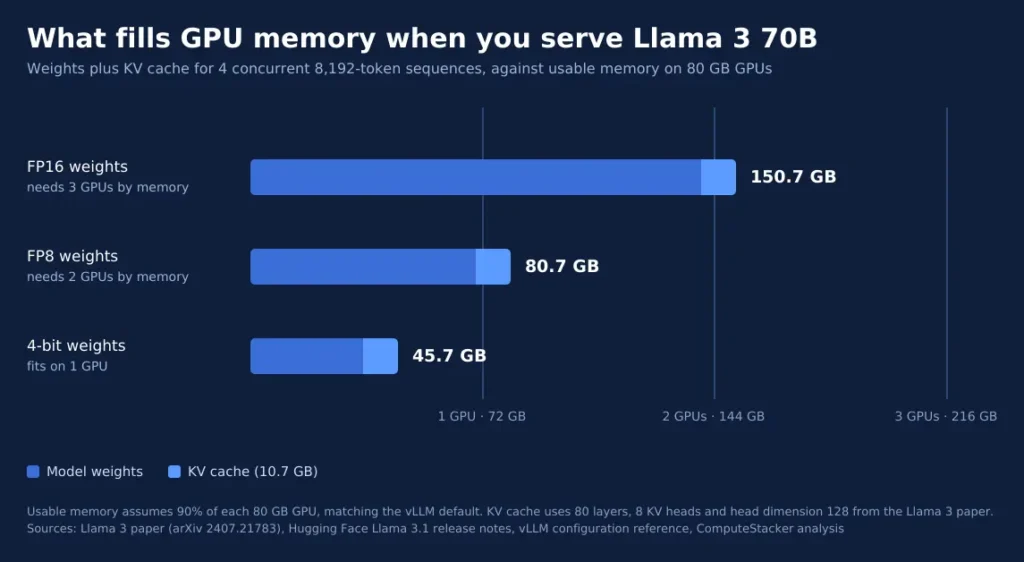
In FP16, the cache requires 150.7 GB, 2.09 times the 72 GB budget. This rounds up to three GPUs by memory only.
However, three is the wrong number here. The next section explains why four GPUs are the safe number. In FP8 weights, this reduces the floor to two GPUs.
Example C: Llama 3.1 405B on one node
FP8 precision requires 405 GB to store the weights of a 405B model. Four sequences require roughly 16.9 GB of cache memory, making the floor 421.9 GB.
It is 5.86 times more than the 72 GB budget, hence six GPUs based on memory. But we train 405B on one node with 8 GPUs.
This way we have 640 GB of raw memory and space for longer contexts. In FP16, the weights alone make up 810 GB, which is beyond one node of 80 GB class.
Why training needs far more memory
Training contains many more components than just the weights. According to the conventional mixed-precision Adam setting in the ZeRO paper, there are 16 bytes per parameter for model states, which consist of 2 bytes of weights, 2 bytes of gradients, and 12 bytes of optimizer states.
The math multiplies quickly:
7B parameters full fine-tune: 16 bytes × 7B = 112 GB of model states. This amount is already above 1×80 GB GPU.
70B parameters full fine-tune: 16 bytes × 70B = 1,120 GB. Given 72 GB per GPU, it will require at least 16 GPUs.
Besides that, activations are required. They increase together with batch size and sequence length.
That’s why sizing the training task by the inference size is a big underestimation of the requirements. As for the cost part of the question, please take a look at our post about the costs of AI training.
How many GPUs do you need?
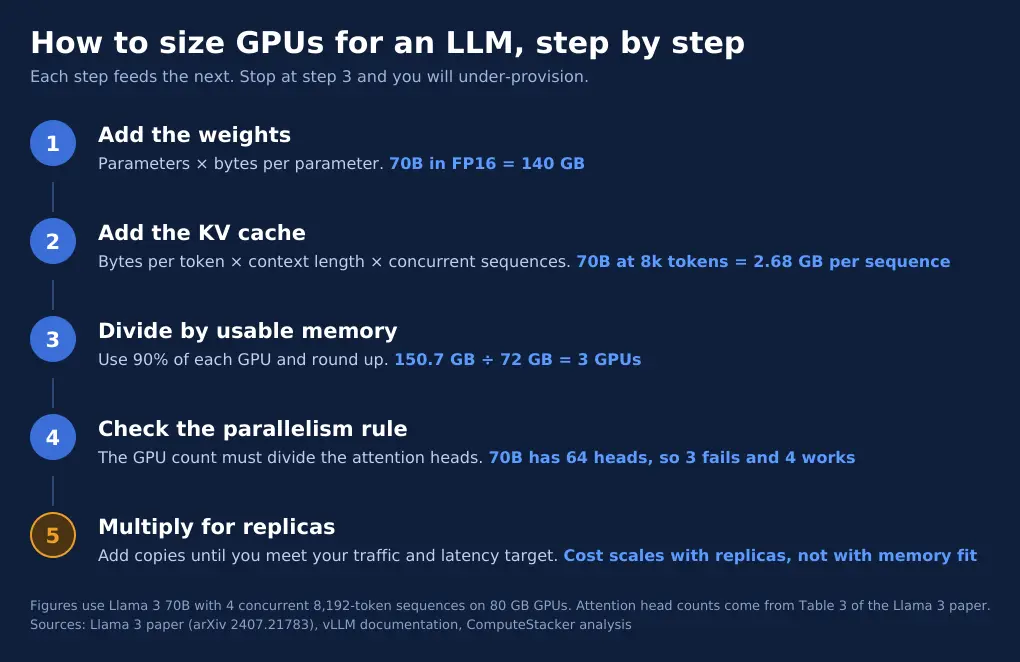
Follow the LLM sizing steps in sequence via the GPU.
- Calculate the weights. Parameters multiplied by bytes at the desired precision.
- Calculate the KV cache. Bytes per token multiplied by context length multiplied by the number of concurrent sequences.
- Divide by the amount of usable memory. Use 90% of each GPU’s capacity and round up.
- Ensure the parallelism condition. Make sure that the number of models fits evenly into the available GPUs.
- Multiply by the number of replicas. Add more copies of the model to reach your traffic needs.
Why the GPU count must split cleanly
Large models span multiple GPUs with tensor parallelism. On each GPU, there is a slice of all layers.
They allocate these slices based on the attention heads. There will be an error message from vLLM when the number of heads is not divisible by the tensor-parallel degree. This problem with the head number occurs frequently among users.
The number of attention heads in Llama 3 70B is 64, and in 405B is 128, as shown in the same table in the Llama 3 paper. Three GPUs are inappropriate for 70B and six for 405B. Four and eight are acceptable for 70B, and only eight for 405B.
That is why they consider four GPUs in Example B and eight in Example C. The additional GPUs enable an increase in the prompt length.
Fit, speed and replicas
Memory fit will give you the capacity to run the model. But memory fit will not tell you whether the model responds on time. Your LLM GPU should have good latency performance as well.
In case one replica cannot handle your traffic, you can go with multiple replicas. Multiple replicas will require multiple GPUs, as each replica requires its own GPUs.
Let us take an example of FP8 70B, where we need two GPUs per replica. So, with two replicas for failover or increased traffic, we need four GPUs.
Memory fit vs serving capacity
Token generation is based on reading the weights from memory. The bandwidth limits the maximum speed of a request.
Nvidia H100 has 3.35 TB/s of memory bandwidth according to its H100 page. The 70B model using FP8 precision has 70 GB of weights.
Dividing 3.35 TB/s by 70 GB, we can get an estimate of around 48 tokens per second for one GPU for one request. This is our back-of-the-envelope estimation, and real-life models will have lower values.
Batching is the thing that makes everything different. They process all requests in one pass through the weights, which increases the speed even when all users have the same speed.
And that is the reason fitting the model does not mean a scalable model. Targets for latency, batch size, and prompt lengths define the number of GPUs.
Test your prompts first. Read our blog about the reasons why it is important to know about GPU usage and find out how underutilization increases your costs. For a more general topic, read how to choose the right GPU.
What a GPU for LLM costs to rent
Price the GPU for LLM hosting in GPU-hours. One GPU running for one hour is one GPU-hour, as our explainer on what a GPU hour is shows.
Take Example B with FP8 weights on two H100s. A 730-hour month adds up to 1,460 GPU-hours.
| Provider | H100 hourly rate | Monthly cost for 1,460 GPU-hours |
|---|---|---|
| E2E Networks | ₹255.55 ($2.65) | ₹3,73,103 (about $3,869) |
| Lambda Labs | $3.99 | $5,825 |
We took these rates on October 9, 2026, and they change often. Both exclude GST, egress and storage. Our H100 pricing breakdown tracks the full market.
Two cautions apply. A replica that sits idle still bills you by the hour, so match replicas to real traffic. Extra charges also add up, which our guide to hidden GPU cloud costs lists in detail.
For the owning-versus-renting question at larger scale, see our neocloud vs hyperscaler TCO analysis.
FAQ
How much memory headroom should I leave?
Leave at least 10% of each GPU unused. The vLLM default reserves that share, as the reference above shows.
Add more if your prompts vary a lot in length. Long outliers can push the cache past your plan and crash the server.
Does an AMD GPU change the sizing?
It can change the count. The AMD Instinct MI300X carries 192 GB of HBM3 and 5.3 TB/s of bandwidth, according to Lenovo’s product guide.
At 90% usable, one MI300X offers about 173 GB. That fits the 150.7 GB FP16 example from earlier on a single card. Check that your serving software supports the card before you plan around it.
Can I use consumer GPUs in production?
Check the licence first. NVIDIA’s GeForce licence states that the software “is not licensed for datacenter deployment”. It makes an exception for blockchain processing.
Consumer cards also carry less memory than data center GPUs. For a lab or a personal project they work well, but rented data center GPUs suit production.
Should I rent or buy GPUs for an LLM?
Rent until your traffic is steady and your utilisation is high. Buying only pays off when the hardware stays busy.
Run the cost example above with your own replica count. If the rental bill is small next to the price of a server, renting wins.
How often should I re-check my sizing?
Re-check whenever the model, context length or traffic changes. A longer context window raises the cache per request.
A new model version can also change layers or heads. Rerun the arithmetic each time, because the right GPU count can move in either direction.
Conclusion
The GPU for an LLM comes down to two sums. Add the weights, then add the cache your traffic needs, and divide by the usable memory of one GPU.
Next, round up to a count that splits cleanly, and test it with real prompts. Then compare prices on the H100 provider page for the GPUs your model needs.
Get personalised, no-commitment quotes from top AI infrastructure providers in under 2 minutes.