Introduction: Begin with the workload, not the GPU
Choosing a GPU for an AI workload often involves comparing technical specifications to select one with more VRAM, greater computing power, or a newer model, for example. However, none of these criteria, when considered alone, tells whether the chosen GPU suits the particular AI workload.
One should begin with a much easier question: what will you do with it?
Training, inference service, fine-tuning, and development workstations will require very different GPU capabilities: some will be limited by memory capacity, while others will be constrained by memory bandwidth or more concerned with latency than with computing power.
This is the main reason why choosing the right GPU for an AI workload should focus on selecting the right hardware for your specific job rather than the best GPU available.
The AI Compute Threshold Report
We analyzed pricing from 150+ GPU cloud providers to find the exact threshold where an AI startup's OpenAI API bill eclipses the cost of a dedicated H100 cluster.
Read the Full ReportPerformance target, and then compare GPUs.
Define the AI workload first
Before looking at GPUs, define what your system will have to do. This is obvious, but that is often the first place where hardware choices go wrong.
AI Training
Training usually means sustained usage of GPU resources for an extended time. Memory, computing power, precision, and multi-GPU scalability can all matter here. For a big AI workload, the question is not just whether your system is able to run the model. The question is whether the amount of training time is within the deadline and budget for the team.
Fine-Tuning
Fine-tuning might require a completely different set of resources compared to full model training. The memory and computing power required depend on the model, fine-tuning approach used, precision, batch size, and other settings. A smaller configuration can be enough for fine-tuning.
AI Inference
Inference changes the picture completely. An inference-based application might have concerns about how fast a response is generated, how many concurrent requests it can handle, or the consistency of the operation. These requirements might result in the choice of GPU for the training workloads.
Generative AI
Images, videos, audio, and other generative tasks can place great strain on memory and computational resources. The resolution, the model size, the batch size, generation parameters, and the desired speed all factor into the hardware considerations.
Development and prototyping
For development, the purchase of top-end capacities may not be necessary. If it is simply a question of testing your model or prototyping, then it might make sense to go for a lower-cost GPU that satisfies your needs.
The message here is not to say which is the better GPU. The idea is to know what you need before making any comparisons.
The GPU specifications that truly matter
After defining the workload, the specifications document becomes easy to understand. Rather than wondering which GPU has the most powerful specifications, you should figure out which specs will work best with your task.
VRAM
GPU memory is usually one of the first items to check because your workload needs to be stored somewhere. However, model weights alone aren’t the end of the story. According to the workload, memory may also be required by activations, gradients, optimizers, KV cache, etc.
Memory requirements vary according to the model and its configuration. Precision, batch size, context length, and whether you’re doing training or inference will affect your memory requirements.
Therefore, instead of asking, “How much VRAM do I get?”, you want to ask, “How much VRAM does my workload require, leaving enough space for everything else?”
Memory bandwidth
While easy to confuse, capacity and bandwidth tackle different needs. The amount of memory of the GPU can be estimated by VRAM. Bandwidth reflects the speed of data movement.
In case the workload spends much time processing data, the bandwidth can limit the performance even when the model is small enough to fit into the memory of the device. Hence, increasing the VRAM of the GPU would not lead to the anticipated improvement in this case.
Compute performance
Compute performance comes in handy when there is a lot of math work performed within the workload. Moreover, modern AI GPUs are optimized for specific types of tasks, such as matrix operations.
However, high compute figures should not be considered guarantees of high performance. Various parameters, such as software, model, precision, memory operations, and workload itself, impact GPU capabilities.
Precision support
AI workloads can use various numeric formats, such as FP16, BF16, and FP8. Reduced precision decreases memory usage and can increase performance in case of support from the hardware.
One should make sure the GPU supports the needed modes of precision before buying it, as well as that the software stack allows using them. Specification becomes useless without proper workload utilization.
Interconnects
Interconnects become critical when more than one GPU comes into play. PCIe and other interconnects like NVLink will affect the GPUs’ ability to communicate and transfer data.
When considering distributed workloads, the communication among the GPUs becomes as important as the compute capacity of the GPUs.
Is your AI workload compute-bound or memory-bound?
This is a simple trick to reduce your choices: What is the GPU waiting on?
If the workload does a lot of computations, it could be compute-bound. If this is true, compute performance will significantly contribute.
On the contrary, if the workload spends most of its time transferring data, it could be memory-bound.
The difference is essential, as GPU upgrades only become helpful when you know where your problem lies.
The simple rule here is to profile first and shop later.
How much GPU capacity is required?
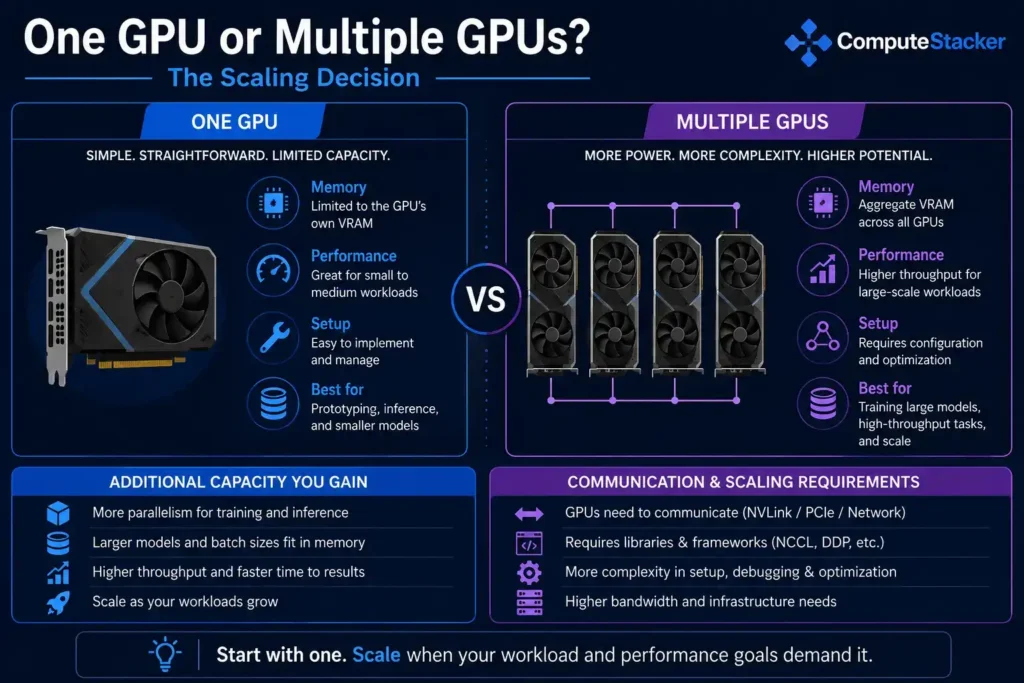
Once you know the characteristics of the workload and its potential constraints, it is time to figure out how much GPU capacity is needed.
When the model runs on one GPU and this GPU achieves the required performance, then it makes sense to start with one GPU. It reduces the number of things to consider, such as communication and other bottlenecks.
Otherwise, multiple GPUs are used to increase memory capacity and performance, as well as to decrease training time for scaling workloads.
However, it should be noted that scalability here is a key concept – simply adding another GPU does not mean increasing performance by 100% because of data exchange, workload distribution, etc.
Match the GPU to your performance requirements
Do not compare two GPUs until you understand what exactly you need to improve. The term “performance” alone is not specific enough.
If latency important
If you have real-time inference and the time to respond to a request is important, then the overall performance may not be relevant.
When throughput is important
In terms of batch processing and inference tasks, how much work is done during the set period of time can turn out to be even more important than the duration of one particular task.
When training speed is important
While for training people pay attention to the time required to complete a run, a more expensive GPU might still prove to be a good choice if it allows reducing the total duration of the process.
When cost-effectiveness is important
What counts is the price to complete the job, not the cost of a single GPU. A less expensive GPU taking twice as long to perform a job doesn’t necessarily mean cost savings.
Don’t forget the rest of the system
The GPU is not a solitary component of the system; other components such as CPU, memory, storage, networking, PCIe configuration, and interconnect between GPUs may impact the outcome of computations performed by the GPU.
Imagine that there is a workload requiring a continuous flow of data into the GPU; if storage or CPU cannot provide a sufficient amount of data, a more powerful GPU will just waste some time idling. The same problem arises in case several GPUs are employed, and communications become a bottleneck.
Therefore, the GPU should be assessed together with the rest of the system, not as an isolated component.
For cloud implementations, it means taking into account not only the GPU itself but the rest of the machine configuration as well, which might have a significant impact on both performance and cost.
Buy or rent your GPU?
There is no single right choice for either buying or renting GPUs. The decision will depend on the predictability of the workload and the consistency of usage of the hardware resources.
Buying
Buying makes sense in the case of relatively stable demand and a high utilization rate of the hardware resources.
Renting
Renting might be a good option if there is uncertainty about demand, the project is temporary in nature, or one simply wants to use a certain GPU without buying hardware.
The fallacy is making the comparison purely on the basis of price per hour. A proper comparison should take into account workload duration, usage rate, storage, data transfer, and other related costs as well.
The key figure will be much closer to the cost of the job.
Make a shortlist of GPUs
Now, it is time to compare real GPUs. You should make a list according to your requirements and the specifications you have to find out, rather than making a ranking.
| Requirement | What to evaluate |
| Model/workload fit | VRAM capacity and headroom |
| Data-heavy workload | Memory bandwidth |
| Compute-heavy workload | AI/Tensor compute and precision support |
| Real-time inference | Latency |
| High-volume inference | Throughput and concurrency |
| Multi-GPU workload | Interconnect and scaling |
| Long-term deployment | Power, cooling, and software compatibility |
| Budget-sensitive workload | Total workload cost |
This way, you make the specification sheet a checklist. The GPU does not have to score high in all categories; it just has to satisfy your requirements.
Testing before investing
It’s the point at which you will be able to cut costs substantially by testing your load before you invest in anything big.
Use exactly the same model and, where possible, exactly the same configuration, precision, batch size, context options, and data samples as you intend to in production.
Then test what counts – VRAM usage, GPU performance, throughput, latency, runtime, and overall costs.
A simple benchmark test won’t give you all the information regarding your future loads, but it will help you discover hardware unsuitable for your tasks before going to scale.
This is not about searching for the most powerful GPU. This is about discovering a suitable GPU for the tasks that need to be done.
Common mistakes when selecting GPUs
- Choosing GPUs just because they are the latest or most powerful models available.
- Focusing on VRAM as the sole deciding specification of GPUs.
- Making comparisons based on computational capabilities without regard to workloads.
- Neglecting memory bandwidth.
- Believing that a better GPU can make up for any deficiencies of the CPU, storage, or networking.
- Scaling up with GPUs without first establishing workload scalability.
- Purchasing more resources than the workloads need.
- Disregarding software compatibility issues with drivers, frameworks, etc.
- Comparing costs in terms of GPU hours without factoring in the cost of the whole job.
- Neglecting to run a representative benchmark prior to a large-scale rollout.
GPU selection checklist
Before making a purchase decision, ask yourself these questions:
1. What workload is my AI application using?
2. What is my target performance level?
3. How much GPU memory do I need for my workload?
4. Is my workload compute-bound or memory-bound?
5. Is latency more critical than throughput?
6. Do I need one GPU or several GPUs?
7. Can my workload be scaled out with the use of GPUs?
8. Is the rest of the system designed to make use of the GPU?
9. Are all the necessary software and precision modes available?
10. How much will it cost to do the job?
11. Have I benchmarked the workload?
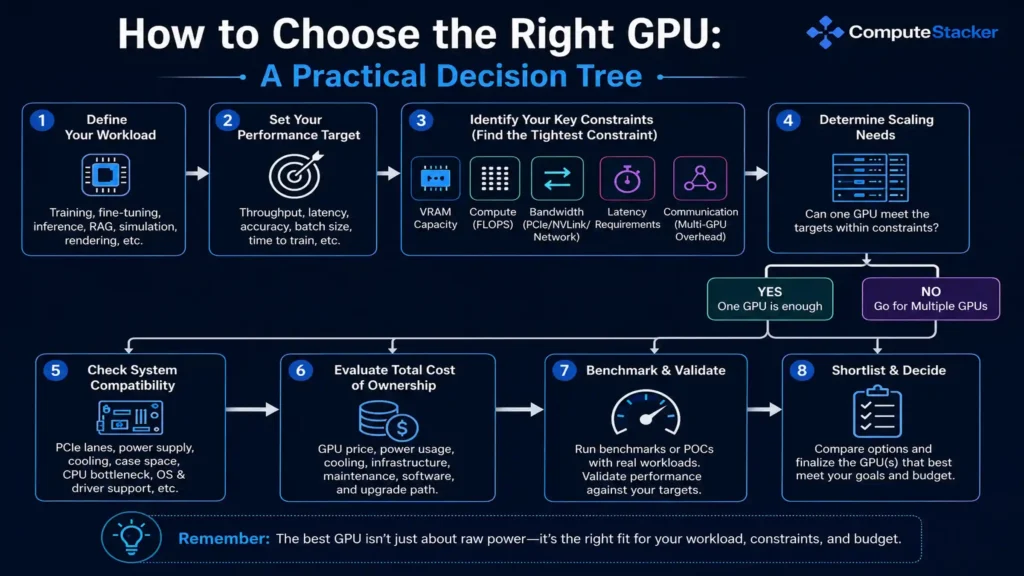
The entire process of choosing a GPU may be simplified into a list of sequential steps:
Workload → performance goal → bottleneck → one GPU or many → system fit → cost → benchmark → short list of suitable GPUs.
The point is that the last step should be a short list, but never a global winner. The workload defines which GPUs are worth considering.
Conclusion: Choose the workload and then the GPU
It is impossible to name one GPU that will work perfectly with any kind of artificial intelligence workload. Your choice of the GPU depends on the nature of the workload, on what goal you have, and on where exactly your workload is going to reach its bottleneck.
Choose your workload first and analyze it: find out how much memory you need, where the bottleneck is, define the performance goal, and whether one GPU is sufficient for that.
Above all else, benchmarking is crucial. The specification sheet will list the capabilities of the GPU. A workload will show you what you will get out of it.
The correct GPU is the one that delivers the necessary performance for your workload without overbuying capability that cannot be used effectively.
FAQs
Which is the most critical GPU specification for AI?
There is no straightforward answer. VRAM might be the first bottleneck, but compute performance or memory bandwidth might be critical once the workload fits.
How much VRAM should I have for AI workloads?
It varies depending on the model, precision, batch size, sequence length, runtime constraints, and whether you are training, fine-tuning, or doing inference.
Is VRAM more critical than GPU compute?
No. If the workload cannot fit into memory, increasing compute performance will not help with that. Otherwise, either compute or bandwidth could become the bottleneck.
What GPU is best for inference of AI models?
It depends on the model, latency requirement, throughput, concurrency, memory requirement, precision requirement, and budget.
What GPU is best for training AI models?
It depends on the model, memory requirements, required training time, precision requirements, and whether the workload requires a multi-GPU setup.
Do I require multiple GPUs for my AI workload?
No. One GPU is sufficient if it can handle the workload and the performance requirements. Otherwise, when the workload requires more capacity and/or performance and can scale effectively, then using multiple GPUs makes sense.
Should I purchase or lease a GPU for my AI workload?
Consider usage rate, duration of the workload, variability of demands, cost of the infrastructure, and overall cost of completing the workload.
How do I determine whether my AI workload is memory-limited or compute-limited?
Profiling and benchmarking are the two best methods to determine what the bottleneck is. Consider what the workload is spending its time doing rather than just looking at a specification.
Get personalised, no-commitment quotes from top AI infrastructure providers in under 2 minutes.