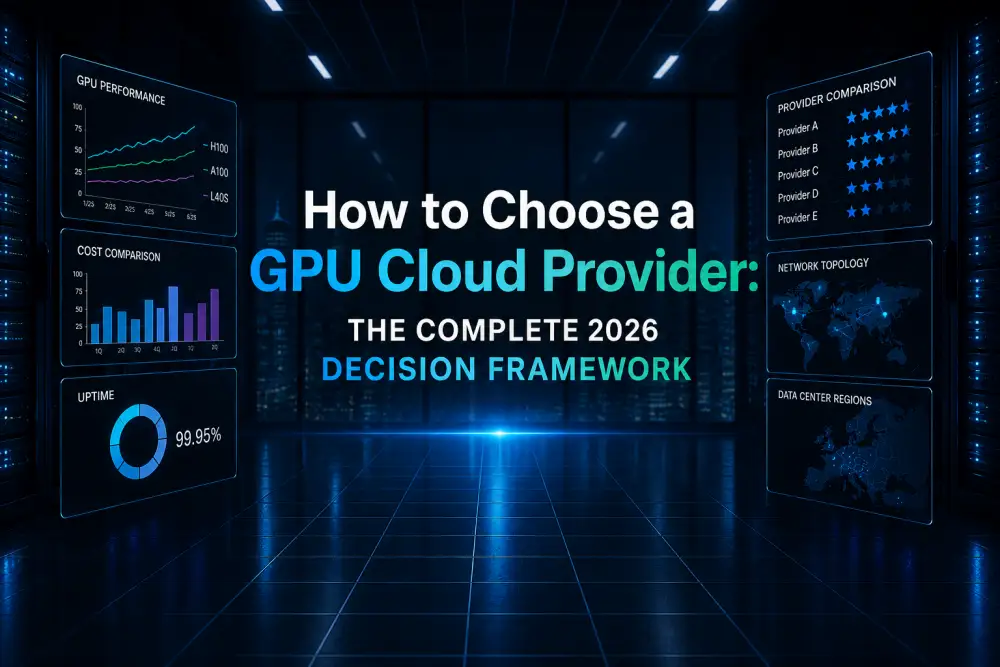
Selecting the right GPU cloud provider is one of the most consequential infrastructure decisions your AI team will make. Choose well, and you accelerate model development while controlling costs. Choose poorly, and you face months of migration headaches, thousands of dollars in wasted compute, and engineering bottlenecks that stall your product roadmap. The market now includes over thirty viable platforms, each with distinct strengths, limitations, and pricing structures. Making a confident choice requires a systematic evaluation framework, not gut instinct.
This guide provides a comprehensive, step-by-step decision methodology for evaluating GPU cloud providers in 2026. We cover the critical questions you must answer before comparing providers, the technical requirements that differ by workload type, and the non-obvious factors (like egress fees and support quality) that often determine whether a provider relationship succeeds or fails over time.
- Start by classifying your workload: training, fine-tuning, or inference each have fundamentally different provider requirements.
- Network topology (InfiniBand vs. Ethernet) matters more than GPU price for multi-node distributed training.
- Hidden costs — egress fees, storage tiers, and minimum commitments — can inflate your bill by 20-40% beyond advertised GPU rates.
- Always validate a provider’s claims by requesting a trial period or benchmarking on their actual hardware before signing contracts.
Step 1: Define Your Workload Profile
The most common mistake teams make is evaluating providers before clearly defining their own requirements. A provider that is perfect for inference serving may be terrible for distributed training. Before visiting a single pricing page, answer these foundational questions:
The AI Compute Threshold Report
We analyzed pricing from 150+ GPU cloud providers to find the exact threshold where an AI startup's OpenAI API bill eclipses the cost of a dedicated H100 cluster.
Read the Full ReportWhat type of workload are you running?
- Large-scale pre-training (16+ GPUs): Requires InfiniBand interconnects, dedicated node allocation, and high-performance parallel storage. This eliminates most decentralized and community cloud providers.
- Fine-tuning (1-8 GPUs): Requires sufficient VRAM per GPU but does not demand high-end networking. Price-per-hour becomes the dominant selection criterion.
- Production inference: Requires guaranteed uptime, auto-scaling capabilities, and low-latency networking to end users. Geographic proximity to your user base matters significantly.
- Batch processing and experimentation: Tolerates interruptions and variable performance. Spot instances and decentralized networks become viable, enabling significant cost savings.
What GPU hardware do you need?
Not all providers carry all GPU types. If you specifically need H100 SXM5 (not PCIe), your options narrow to approximately 8-10 providers. If you need A100 80GB (not 40GB), verify the exact variant before committing. Some providers advertise “A100” without specifying the VRAM configuration, which can cause out-of-memory failures with larger models. Check our GPU Types Directory to understand the differences between GPU variants.
Step 2: Evaluate Network Infrastructure
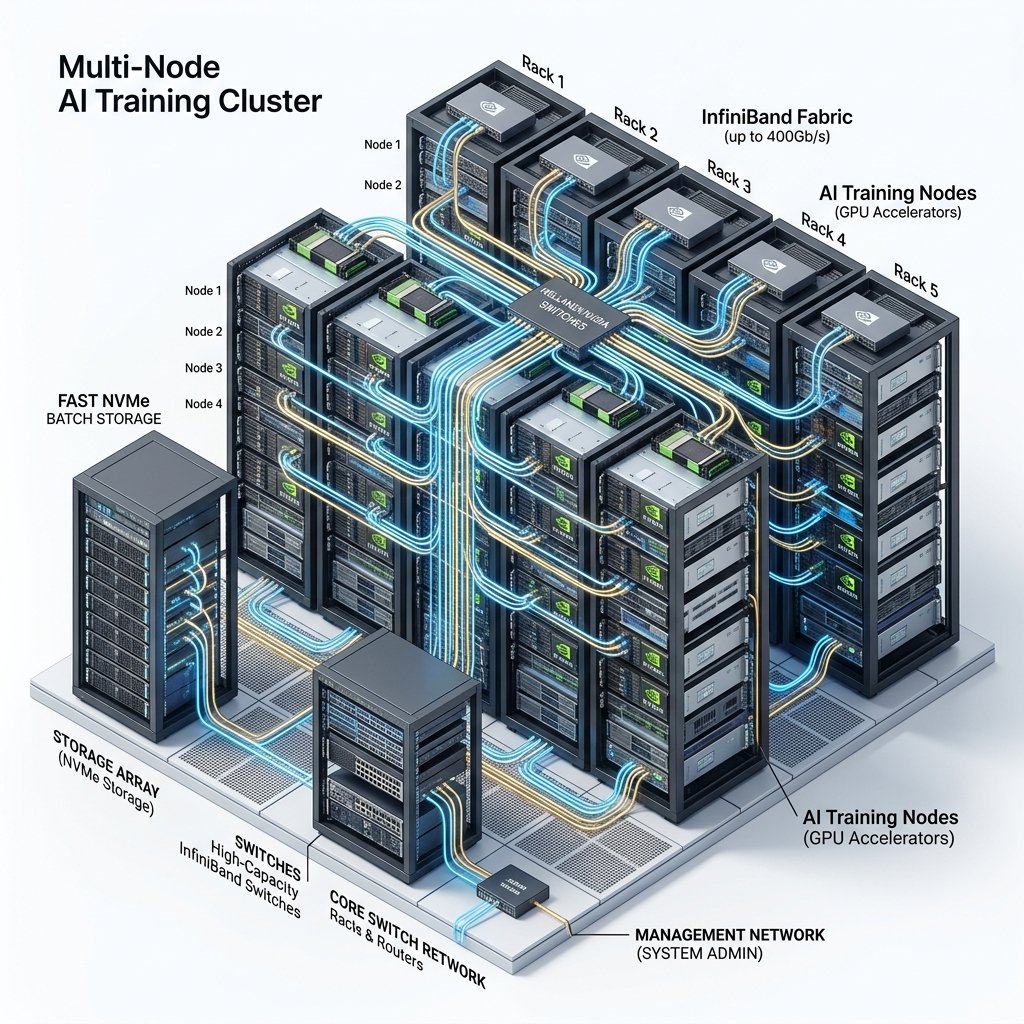
For single-GPU workloads, network infrastructure is largely irrelevant. But the moment you scale to multi-node training (more than 8 GPUs on most providers), the network becomes the primary bottleneck determining your training throughput and cost efficiency.
InfiniBand vs. Ethernet
The gold standard for distributed AI training is NVIDIA InfiniBand NDR at 400 Gbps. InfiniBand provides dramatically lower latency and higher bandwidth than standard Ethernet, which directly translates to faster gradient synchronization during the all-reduce communication phase of data-parallel training. In our benchmarks, a 32-GPU training job on InfiniBand completed 35% faster than the identical job on 100 Gbps Ethernet — a difference that translates to thousands of dollars in savings on multi-week runs.
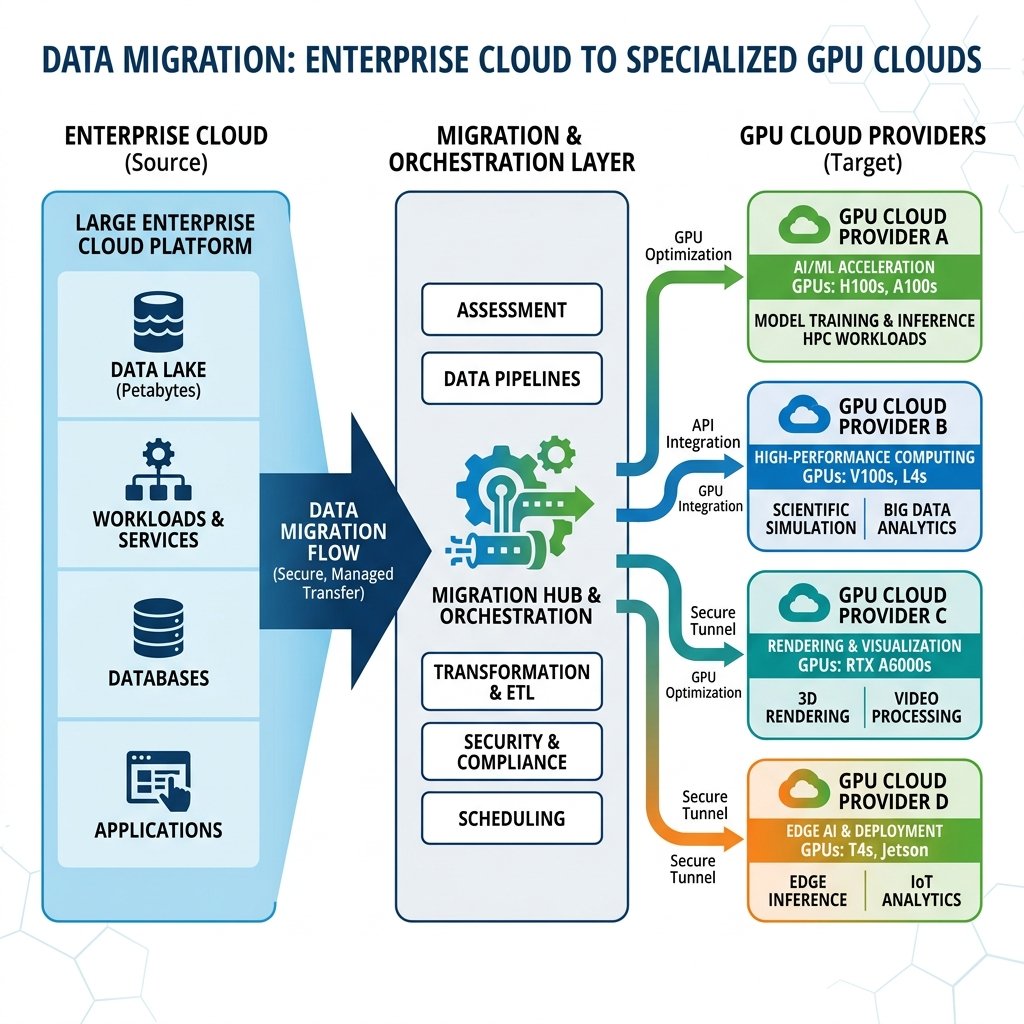
Providers that offer InfiniBand for their H100 clusters include CoreWeave, Lambda Labs, Voltage Park, and the hyperscalers (AWS, GCP, Azure). Most decentralized and community cloud providers connect nodes via standard Ethernet, making them unsuitable for jobs requiring more than 8 GPUs.
Network Topology
Even among InfiniBand-equipped providers, the network topology matters. A non-blocking fat-tree topology ensures that any node can communicate with any other node at full bandwidth. Oversubscribed topologies save the provider money on switches but create communication hotspots during large-scale all-reduce operations. When evaluating enterprise providers for large clusters, specifically ask about their InfiniBand oversubscription ratio. A ratio of 1:1 (non-blocking) is ideal; ratios above 2:1 will measurably impact training performance.

Step 3: Analyze Total Cost of Ownership
The advertised GPU hourly rate is the most visible cost component, but it is frequently not the largest. A thorough cost analysis must include several additional factors that vary dramatically between providers.
Data Egress Fees
Hyperscalers charge $0.08-0.12 per GB for data leaving their network. If your workflow involves moving model checkpoints, training logs, or evaluation results to external systems, these costs accumulate rapidly. A 70B parameter model checkpoint is approximately 130GB. Exporting 10 checkpoints per training run costs over $100 on AWS just in egress fees. Specialized providers like Lambda Labs and CoreWeave typically offer free or heavily subsidized egress, which makes a substantial difference for multi-cloud architectures.
Storage Pricing
GPU instances require both boot storage (for your OS and code) and data storage (for your training dataset). Boot storage is typically included in the GPU hourly rate. Data storage, particularly high-IOPS NVMe storage required for large-scale training, is usually charged separately. Expect to pay $0.10-0.25 per GB per month for SSD-backed storage and $0.30-0.50 per GB per month for ultra-fast NVMe tiers. For a 5TB training dataset, monthly storage costs range from $500 to $2,500 depending on the performance tier.
Minimum Commitments
Some providers require minimum contract lengths or spending commitments, particularly for H100 and larger cluster allocations. CoreWeave typically requires 6-12 month commitments for dedicated clusters. Voltage Park requires minimum 1-month reservations. If your compute needs are unpredictable or short-term, these commitments create financial risk. Providers like RunPod and Vast.ai have no minimums, making them ideal for experimental and variable workloads.
Step 4: Assess Reliability and Support
Provider reliability becomes critically important during long training runs. A node failure 80% through a 14-day training job can waste thousands of dollars if checkpoints are not properly configured or if the provider cannot quickly replace the failed hardware.
Service Level Agreements (SLAs)
Enterprise providers typically offer 99.9% uptime SLAs with financial credits for violations. Community and decentralized providers generally offer no SLA guarantees. For production inference workloads serving end users, an SLA is non-negotiable. For research and experimentation, the risk of occasional downtime is often acceptable given the significant cost savings.
Technical Support Quality
When a GPU node experiences a hardware failure at 2 AM during a critical training run, support response time becomes the difference between a minor inconvenience and a project-derailing disaster. Evaluate providers on their support channels (Slack, email, phone), response time guarantees (under 15 minutes for critical issues is ideal), and the technical depth of their support staff. The best providers employ ML engineers on their support team who can debug CUDA errors and networking issues alongside you.
Step 5: Verify Compliance and Security
For teams handling sensitive data — healthcare records, financial information, or EU citizen data subject to GDPR — compliance certifications are mandatory requirements, not optional features.
Critical Certifications
- SOC 2 Type II: Verifies that the provider implements controls for security, availability, processing integrity, confidentiality, and privacy. Most enterprise providers (CoreWeave, Lambda Labs, and all hyperscalers) maintain SOC 2 certification.
- ISO 27001: International standard for information security management systems. Particularly important for European and multinational enterprises.
- HIPAA Compliance: Required for healthcare AI applications processing Protected Health Information. Only a subset of GPU cloud providers offer HIPAA-compliant environments.
- GDPR Compliance: Mandatory for processing EU citizen data. Requires data residency within the EEA and a signed Data Processing Agreement (DPA) with the provider.
Data Residency
For teams subject to data sovereignty requirements, knowing the exact physical location of the servers running your workload is essential. Verify that the provider can guarantee deployment in specific geographic regions and that data does not traverse non-compliant jurisdictions during processing. Explore our Region Directory to find providers with data centers in your required geography.
Step 6: Test Before You Commit
No amount of documentation review replaces hands-on testing. Before signing any long-term contract or committing significant budget to a provider, insist on a trial period or proof-of-concept engagement. During your trial, specifically test for:
- Provisioning speed: How quickly can you launch GPU instances? Under 60 seconds is excellent; over 10 minutes indicates capacity constraints.
- GPU utilization consistency: Run your actual training workload and monitor GPU utilization via nvidia-smi. Consistent 95%+ utilization indicates a well-configured system. Frequent drops below 80% suggest CPU, storage, or network bottlenecks.
- Checkpoint I/O performance: Save and load a large model checkpoint. If saving a 30GB checkpoint takes more than 60 seconds, the storage subsystem will bottleneck your training pipeline.
- Multi-node scaling efficiency: If your workload requires distributed training, measure training throughput as you scale from 1 node to 2, 4, and 8 nodes. Ideal linear scaling means doubling nodes doubles throughput. Real-world systems achieve 85-95% scaling efficiency on InfiniBand; anything below 75% indicates network problems.
Provider Comparison Decision Matrix
| Criterion | CoreWeave | Lambda Labs | RunPod | AWS |
|---|---|---|---|---|
| Best For | Enterprise training | Research/simplicity | Budget/serverless | Enterprise ecosystem |
| InfiniBand | ✅ 400Gbps NDR | ✅ Limited | ❌ | ✅ EFA |
| Minimum Commit | 6 months | None | None | None (1yr for discounts) |
| Egress Cost | Free | Free | Free | $0.09/GB |
| SOC 2 | ✅ | ✅ | Partial | ✅ |
Common Mistakes When Choosing a GPU Cloud Provider
Through our extensive provider evaluation process, we have observed several recurring mistakes that teams make when selecting their AI compute partner. Avoiding these pitfalls can save months of frustration and thousands of dollars in wasted resources.
Mistake 1: Optimizing Solely on Hourly Price
The cheapest GPU per hour is not always the cheapest total cost. A provider charging $2.00/hr for an A100 but with an oversubscribed network, slow storage, and frequent interruptions can deliver 30% lower GPU utilization than a provider charging $2.50/hr with a properly configured system. The provider at $2.50/hr actually costs less per completed GPU computation because the hardware is used more efficiently. Always benchmark actual workload performance, not just hourly rates.
Mistake 2: Ignoring Egress Fees Until Production
Many teams discover egress costs only after their training is complete and they need to export model checkpoints, evaluation data, or migrate to a different inference platform. A 70B model checkpoint is approximately 130GB. On AWS, exporting this costs roughly $12 per checkpoint. Over a training run with 50 checkpoints, that is $600 in egress alone — a cost that would have been zero on Lambda Labs or CoreWeave. Factor egress fees into your total cost analysis before choosing a provider.
Mistake 3: Not Requesting a Trial Before Committing
Providers’ marketing materials describe ideal conditions. Real-world performance can differ significantly due to noisy neighbors, oversubscribed networks, or storage bottlenecks. Any reputable provider should offer a trial period or free credits for evaluation. Run your actual workload for at least 24 hours to validate performance claims before signing contracts or committing significant budget. Test provisioning speed, GPU utilization stability under load, and checkpoint save/load performance specifically.
Mistake 4: Choosing Based on GPU Brand Name Alone
Not all H100 instances are equal. The SXM5 variant with NVLink delivers dramatically different multi-GPU performance than the PCIe variant with standard interconnects. Similarly, an “A100” listing might be the 40GB variant rather than the 80GB variant, causing out-of-memory errors with larger models. Always verify the exact GPU variant (SXM vs. PCIe), VRAM capacity, and interconnect type before provisioning. Check our GPU Types Guide for detailed variant specifications.
Use our provider comparison engine to build a customized matrix based on your specific requirements, or request quotes from multiple providers simultaneously.
Frequently Asked Questions
Can I use multiple GPU cloud providers simultaneously?
Yes, and many sophisticated AI teams adopt a multi-cloud strategy. A common pattern is using an enterprise provider (CoreWeave) for production training, a budget provider (RunPod) for experimentation, and a serverless platform for inference APIs. The key enabler is containerization — packaging your workloads in Docker ensures portability across providers. Store datasets on provider-neutral storage (Cloudflare R2 or Wasabi) to avoid egress penalties when switching between clouds.
How important is InfiniBand for my workload?
InfiniBand is essential only for multi-node distributed training (more than 8 GPUs). For single-node workloads (1-8 GPUs), fine-tuning, and inference, standard Ethernet is perfectly adequate. If your workload fits on a single 8-GPU node, you can safely prioritize price over networking capabilities, potentially saving 30-50% by choosing providers without InfiniBand infrastructure.
What should I look for in a GPU cloud provider trial?
During a trial, test three specific things: (1) Launch latency — how quickly instances become available; (2) GPU utilization stability — run your actual workload for 24+ hours and monitor for utilization drops below 90%; (3) Checkpoint I/O speed — save and load a model checkpoint to verify storage performance. Any provider confident in their infrastructure should offer a free trial or credits for this evaluation.
Do I need SOC 2 compliance from my GPU cloud provider?
SOC 2 compliance is essential if you process customer data, healthcare records, financial information, or any data subject to regulatory requirements. For research using publicly available datasets, SOC 2 is not strictly necessary. However, even for research teams, choosing a SOC 2 compliant provider provides assurance that the infrastructure meets baseline security standards for access controls, encryption, and data handling practices. Most enterprise customers will require SOC 2 certification from their vendors.
Get personalised, no-commitment quotes from top AI infrastructure providers in under 2 minutes.