Looking at the pricing of GPUs on any webpage, one will be able to see the price per hour, per GPU, and sometimes even the price per second. The price mentioned is actually a cost per GPU-hour, which is not a price by itself but a unit of usage-based access. In any case, GPU-hours and dollars have become a kind of uniform currency in the AI infrastructure market. When purchasing their first GPU-hours, new customers tend to regard them as fixed units like kilowatts or liters.
Key takeaways
- A GPU-hour is a measure of compute time: one GPU used for one hour, no matter what it is computing for an hour.
- GPU-hours = number of GPUs × number of hours used. Running eight GPUs for 10 hours gives 80 GPU-hours.
- The value of the GPU-hour varies. H100 GPU-hours and the old A100 GPU-hours might differ from each other in productive time many times over.
- Granularity is important for billing, more than most customers would think. The difference of 15 to 30 percent in the bill can be due to rounding to the nearest hour.
- You’ll also find GPU-hours on the pricing page, since AI researchers frequently use this metric to measure as a measurement of computational effort spent training the model.
What this unit actually measures
A GPU-hour is a measure of time, not a performance metric. It measures how long you had access to the GPU. It doesn’t say anything about how much work you actually complete in that time.
Imagine it in terms of kilowatt-hours. A kilowatt-hour represents how much electricity passed during the hour and does not say anything about the brightness of the bulb and efficiency of converting electricity into light. The same thing happens with GPU-hours. It represents how long your GPU was running, but not how fast your GPU processed your work.
The calculation of GPU-hours is straightforward:
The AI Compute Threshold Report
We analyzed pricing from 150+ GPU cloud providers to find the exact threshold where an AI startup's OpenAI API bill eclipses the cost of a dedicated H100 cluster.
Read the Full Report
A GPU running for one hour equals one GPU-hour, whereas 8 GPUs running for one hour equals 8 GPU-hours, since you consume 8 GPU-hours simultaneously. Running the same 8 GPUs for 10 hours means that you consumed 80 GPU-hours.
This is why GPU-hours, instead of “hours rented,” became the common metric for measuring compute consumption. An experiment on one GPU cannot be compared in wall-clock time to a training cluster of 512 GPUs. But it can in GPU-hours.
A simple cost calculation
Suppose you are optimizing a medium-sized model. The time to complete will be six hours using four GPUs at a cost of $2.50/GPU hour. How do these figures work out?
| Scenario | GPUs | Hours | GPU-hours | Rate per GPU-hour | Estimated cost |
|---|---|---|---|---|---|
| Small fine-tune | 1 | 6 | 6 | $2.50 | $15 |
| Mid-size fine-tune | 4 | 6 | 24 | $2.50 | $60 |
| Larger training run | 8 | 24 | 192 | $2.50 | $480 |
It is not the calculation that is difficult, but getting the number of hours and the correct price to multiply by that stumps most people. This is what this entire article is about.
A real-world example: How many GPU-hours are needed to train the AI model?
GPU-hour numbers help calculate how much training a large model takes because it is the easiest way to compare across laboratories, computer types, and cluster size without going into proprietary information on training time and architecture.
The DeepSeek technical documentation for DeepSeek-V3 states that the total training time of the model has been about 2.788 million H800 GPU-hours. Assuming a compute cost of around $2 per GPU-hour, independent estimates put the compute cost of that run at about $5.6 million, though DeepSeek itself doesn’t list any such number in its paper.
On the other hand, independent estimates of the compute cost of training GPT-3 put those numbers in the millions of dollars, with hundreds of thousands of GPU-hours required based on the choice of hardware, according to an early third-party analysis. However, it is important to know that these are third-party estimates; neither DeepSeek nor OpenAI have publicly released official numbers in this regard.
Both cases are indicative of one thing: GPU-hours are the units in which people try to express compute costs in a project-independent way.
Why the rate isn’t the whole story
But this is what every explanation misses. This is also what truly matters when it comes to price comparisons.
The GPU-hour only measures how long you’ve been renting out a particular GPU. It doesn’t tell you whether you got the latest GPU, whether it carried sufficient memory, whether it had sufficiently powerful interconnects, or how many of those hours were actually usable.
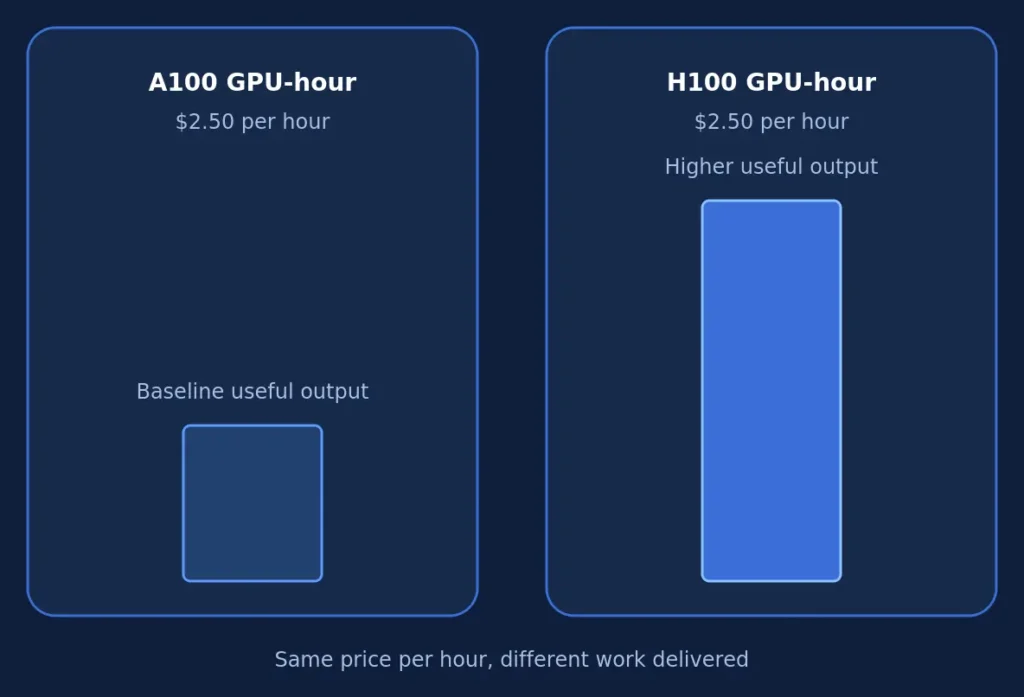
Consider an example of two different GPUs: an H100 and an A100. A provider can charge the same unit price for both, but their actual values differ. Due to the Transformer Engine in the H100 and greater memory bandwidth, it is able to get several times more throughput per hour for transformer workloads. So, if two GPUs, an A100 and an H100, happened to carry the same $2.50 per GPU-hour price, it would not mean that one is cheaper than another.
That’s not the only difference, either. The interface makes a difference. SXM and PCIe versions of the same GPU can differ significantly in multi-GPU workloads because the SXM version’s NVLink interconnect can pass data between GPUs a few times faster than PCIe. Two H100 GPU-hours on paper, but drastically different in how fast the training runs, based on the actual connector.
Utilization paints another picture. A GPU-hour used at full capacity provides considerably more computation than one where the accelerator spends some time waiting for the data transfer. GPU utilization, not GPU quantity, becomes the more impactful factor in cost efficiency – and that holds true even when comparing GPU-hours individually.
Consider the underlying hardware rather than just the metric value when comparing two quotes.
Per-second, per-minute, or per-hour: why billing granularity matters
Billing granularity is nothing but the minimum unit of time for which a particular provider charges. Providers charge per second, some per minute, and some even round off the billing to the nearest hour.
This difference might not seem very relevant, but its impact could be huge at times. Completing a task in 35 minutes on a provider whose billing is based on the whole hour means you pay for the complete hour despite using 25 minutes less.
| Billing granularity | Example providers | Effect on a 35-minute job |
|---|---|---|
| Per-second | Google Cloud Compute Engine, several GPU-specialized clouds | Billed for roughly 35 minutes of usage |
| Per-minute | Some marketplace platforms | Billed for 35 minutes, rounded to the nearest full minute |
| Per-hour | Some legacy or fixed-rate providers | Billed for a full 60 minutes |
If you use cloud services for long training sessions lasting over several days, this difference might not matter much, since the rounding loss spreads across hundreds of hours. Short-duration workloads tell a different story. Running inference tests, setting up CI pipelines, or even doing quick fine-tuning exercises can add 15-30% to your budget when providers round the billing up to the nearest hour.
Always compare two hourly rates only after checking their billing granularities.
How to use GPU-hours to estimate your own job’s cost
Calculating the real costs of running a job on a GPU comes down to four pieces of information, and the very first one is typically the most uncertain.

The first step involves calculating the runtime of the job itself. Use prior examples of jobs that are somewhat similar, or benchmarking numbers from a comparable model and batch size. This is the information that is the least certain out of all the other details, so be prepared to add some margin to this.
Then comes the multiplication of this number by the number of GPUs. It is not uncommon to mistake the runtime itself for the GPU runtime – a 6-hour run of a job across 4 GPUs would be 24 GPU-hours, not 6.
Finally, multiply by the actual GPU-hour price for the model and region you intend to use. This would be a more specific piece of data than just the headline price found on a company’s website. The pricing page is designed to highlight the best possible price for a particular service rather than the actual price you are paying.
Lastly, include any additional cost that is not accounted for by the GPU hour pricing. The majority of the platforms exclude storage costs, data egress, network costs, and commitment minimums from the published GPU-hour pricing. This is usually enough to change the bill more than anticipated. There is some insight about the additional cost areas one should take into account.
Current GPU hourly rates vary considerably across all major cloud platforms and go anywhere from $0.05 per hour to above $10 per hour depending on the GPU type, its location, and the provider’s tier, based on pricing tracked across dozens of providers. The exact price should be used, not the calculated average. The only quick and reliable way to determine the prices is to compare the current rates on the providers.
Common mistakes when comparing GPU-hour pricing
One of the most popular is the comparison of sticker prices without accounting for the GPU generations. The lower per-hour price might prove to be more expensive because the process will take significantly more time.
Not far behind is overlooking the wasted time due to rounding for hours. Small, frequent tasks lead to a significant amount of lost money due to rounding from any service that does not bill by the minute or second.
It’s tempting to treat the GPU-hour price as the total price, but providers usually charge storage, egress, and networking fees separately, and these can make up a significant share of your bill.
There is a need to pay special attention to spot and marketplace prices. The lowest GPU-hour figures most likely come from interruptible spot capacity, which a provider can reclaim and terminate midway through a task without much notice.
The other thing to avoid is using average industry prices instead of the actual price. GPU-hour prices have changed greatly over the last year as manufacturers released new hardware and supply increased. A price you calculated a few months ago might not be valid anymore.
FAQs
How much does a GPU-hour cost?
The cost of a GPU-hour can vary a lot, ranging from $0.05 all the way up to more than $10 an hour. The lower price will be associated with entry-level GPUs on decentralized networks, while higher prices are associated with high-end GPUs like H100 and B200s on hyperscalers. Prices change a lot, so it is recommended to verify the current price before using any particular number.
How do you calculate GPU-hours?
Multiply the number of GPUs by the number of hours they operate. This gives us 24 GPU-hours for four GPUs operating six hours a day. Then multiply that product by the cost per GPU-hour provided by the service provider.
Is a GPU-hour the same across all providers?
No. A GPU-hour is a measure of time-access. An H100 GPU-hour and an A100 GPU-hour can produce entirely different amounts of compute at the same price level because the performance depends on several factors such as the generation of the GPU, memory, interconnection capabilities, and utilization.
What’s the difference between a GPU-hour and a compute credit?
GPU-hour is a standardized unit that depends on the hardware and its time of operation: one GPU running for one hour. A compute credit is a unit used by a specific vendor, and its value depends on the vendor.
How many GPU-hours does it take to train a large language model?
This is highly variable depending on the model size and hardware used. The training operation for DeepSeek-V3 has cost around 2.788 million H800 GPU-hours, as per DeepSeek’s technical documentation. Fine-tuning tasks with smaller models can cost as little as single-digit to a few hundred GPU-hours, whereas the pretraining tasks for models at the bleeding edge can cost even millions of GPU-hours.
Why do some providers bill per second and others per hour?
This depends on the combination of competitiveness and practicality considerations. Providers with the capability to meter consumption accurately, like specialized GPU clouds and Google Cloud, bill based on the second to prevent any overpayment due to partial consumption. Simplistic billing providers with fixed-rate contracts are more inclined toward rounding off to the nearest hour.
The GPU-hour is a starting point, not the final answer
Knowing what a GPU-hour is is table stakes. Knowing how to use it means understanding that the cost per hour is only one variable amongst many. GPU-hour costs will always get lower as new GPUs get released, but the difference between an inexpensive GPU-hour and a valuable one won’t disappear without some effort. The customers who will win here aren’t those who are trying to find the lowest figure in a price sheet. They’re those who understand what that figure gives them.
For those curious about how today’s GPU-hour costs stack up, check out the current live pricing by GPU model and provider.
Get personalised, no-commitment quotes from top AI infrastructure providers in under 2 minutes.