GPU pricing pages are optimized to make one number shine. It is placed prominently at the top of the page in big font, next to a currency symbol and “/hr”. It is rarely the price you pay at the end of the day. The difference between what is written and what you will actually pay – that’s where a real share of your rental budget leaks out stealthily.
We see tons of such pages at the providers listed by us. Here’s our guide to the three tricks you are likely to find there: per GPU vs. per node pricing; “from” pricing scheme and reserved rate anchoring. Once you know their names, they won’t work on you anymore.
Per-GPU vs per-node pricing
First off, see what kind of unit the number applies to. You will never get an H100 or an H200 SXM module as a standalone part – it will come to you on an HGX baseboard on an eight-GPU HGX baseboard. A DGX H100 is based on eight GPUs with 640 GB of total GPU memory.
That means that a node here is an assembly of eight GPUs connected via NVLink and NVSwitch. There are two honest ways of giving a price quote and one way of confusing you. One can give a price per GPU or a price per node. Both options are OK. The issue starts when you see a price per node quoted the same way a competitor quotes his price per GPU. A $24/hr node will look eight times more expensive than the $3/hr card right next to it even though it is the same amount of money.
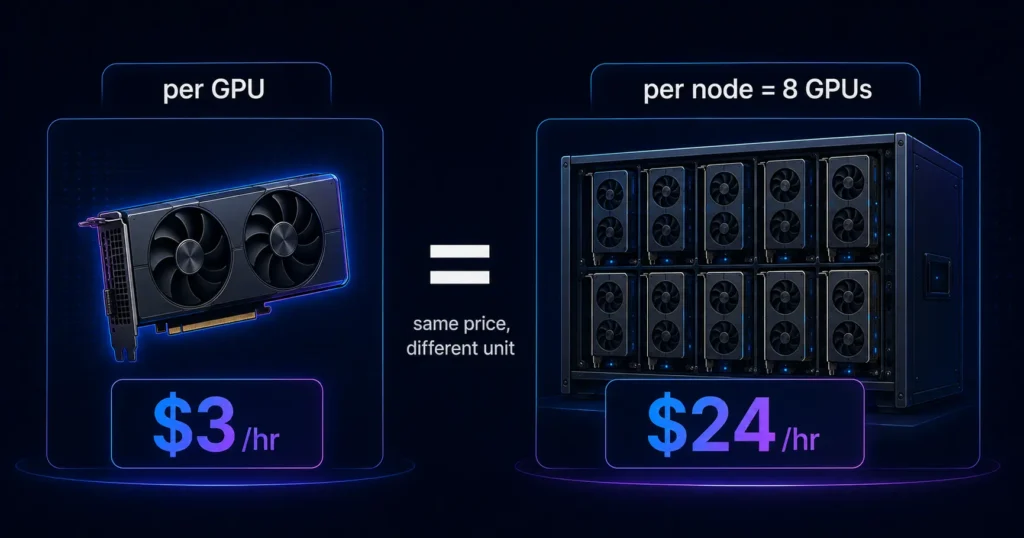
The solution lies in mathematics. It involves dividing the node price by the number of GPUs that the node houses. The other side of the trick is also the same. In this case, one multiplies the price for each GPU by eight to arrive at the node price. In cases where the page does not specify the number of GPUs on the node, that should be the first question to ask before making any comparison.
The AI Compute Threshold Report
We analyzed pricing from 150+ GPU cloud providers to find the exact threshold where an AI startup's OpenAI API bill eclipses the cost of a dedicated H100 cluster.
Read the Full ReportBe aware of the other trick too. The very low price for each GPU might assume the renting of the entire node. Renting only two GPUs of an eight-node system may lead to higher prices due to premiums charged in some cases.
The “from” pricing game
The word “from” carries more meaning than any other word on a GPU pricing page. “From $1.99/hr” makes an assumption about the most affordable package offered, and not the most booked one. This minimum price will be based on some conditions that are not highlighted in the headline.
The common ones:
- Extended commitment period. The floor rate usually refers to the one year or three-year committed price, rather than the on demand price.
- Spot/preemptible capacity. The floor price is applicable to instances that may be terminated abruptly and hence suited for fault tolerant tasks, but bad for a training instance at the hour of 40.
- Region-specific. The most cost-effective region could be miles away from where you have your data and users, causing egress and latencies.
- Older generation GPU. The “from” could be an A100 or an L40S when you need when you actually want the newer, higher-tier H100.
- Whole node or pay upfront. The floor assumes you purchase the entire node or pay upfront.
It’s not fraud, it’s just selective pricing. And how you get through that is to completely disregard the “from” figure and rebuild your own cost number, which reflects your specific situation – your specific GPU, your specific commitment, your specific geography, your specific instance type.
Reserved-rate anchoring and the number you actually compare
The technique of anchoring in pricing comes directly from the world of retail, where a higher figure is presented first to make the following figure appear as a good deal. Anchoring is used on the pages of GPU on both sides.
At times the on-demand price is made larger while the reserved price is presented alongside it, and the percentage saving. Commitment appears to be the obvious choice in such a scenario. At other times it is the reserved price that becomes the focus, while the on-demand price takes a backseat. This layout is designed to influence the consumer into choosing a price even before deciding which one suits his requirements.
To counter this tactic, one must separate the two questions that are being combined on that webpage. The first question would be to find out the true on-demand price without commitment. Secondly, how much discount does the commitment offer.
If the GPU is not used for 50 percent of the contract period, then the discounted rate of 40 percent makes no difference at all. Price both on-demand and reserved paths separately and compare them with your actual usage as opposed to comparing them with some number on the page.
A quick checklist for reading a GPU pricing page
This is the checklist that we use for each provider that we add. It applies to almost any pricing page.
● Establish the unit. Either per GPU or per node, and the number of GPUs per node.
● Conform the price to the per GPU hourly rate, putting everything in one comparable scale.
● Clarify what “from” is referring to. This can be commitment, spot, region, GPU type or prepay.
● Interpret on-demand and reserved as two separate rates rather than a single discounted one.
● List all other items that the hourly rate does not cover: storage, egress, public IP and minimum billable increments.
● Establish the granularity of the billing. Second, minute, hour or minimum block affect the actual price of short instances.
● Verify the rate on the purchase date. GPU prices change so frequently that the rate of last month is an estimate.
Run those seven checks and the marketing layer falls away, leaving the number you will actually pay.
The bottom line
It is first and foremost a selling page with references secondary. The head rate is designed to catch your attention, not tell you what you are going to pay. Standardize the units, strip away the “from” price’s conditions, and interpret the on demand and reservation prices separately. And suddenly everyone is aligned along the same axis and can be compared fairly.
The art of reading a GPU pricing page comes down to translating the number on the page into the one you will have to pay.
Frequently asked questions
Per-GPU pricing quotes the cost of a single GPU per hour. Per-node pricing quotes a full server, which for high-end NVIDIA hardware usually holds eight GPUs on an HGX baseboard or in a DGX system. To compare fairly, divide any per-node price by the number of GPUs in the node so both figures sit on a per-GPU basis.
The “from” rate is the cheapest configuration a provider offers, not the typical one. It usually assumes a long reserved commitment, spot capacity, a specific region or an older GPU. Rebuild the price for your exact GPU, term and region to find what you will actually pay.
reserved rate is only cheaper when you use the capacity for the full term. A discount of 30 to 50 percent saves nothing if the GPU sits idle for part of the contract. Weigh the reserved and on-demand paths against your real utilization rather than against each other.
e hourly GPU rate often leaves out storage, data egress, public IP charges and minimum billing increments. Billing granularity matters too, since per-hour or minimum-block billing raises the real cost of short jobs. Add these before you compare providers.
GPU rental rates move frequently as supply and demand shift. A rate you saw last month can already be stale. Check the live price on the day you book rather than trusting an earlier figure.
Get personalised, no-commitment quotes from top AI infrastructure providers in under 2 minutes.