
Adding more GPUs seems the right thing to do whenever an AI job demands more compute. However, it turns out that adding more GPUs does not necessarily mean that you will get more useful compute out of the deal.
If your GPUs waste a lot of time waiting for data, CPU computations, storage, networking, or anything else, then adding new hardware components will only add more unnecessary capacity to your system.
GPU utilization becomes a key metric to assess AI computing infrastructure, rather than the number of GPUs it has.
You can have 10 GPUs but actually use fewer resources than an optimized system with five. The point is not about having many GPUs. The point is about maximizing the usage of the existing GPUs.
The AI Compute Threshold Report
We analyzed pricing from 150+ GPU cloud providers to find the exact threshold where an AI startup's OpenAI API bill eclipses the cost of a dedicated H100 cluster.
Read the Full ReportKey takeaways
- Having more GPUs does not equate to having more usable compute.
- There can be external factors that cause low utilization of the GPUs.
- 100% GPU utilization does not necessarily equal the highest possible efficiency.
- Sometimes optimizing utilization can give better returns than upgrading hardware.
- GPU utilization needs to be analyzed together with workload performance, capacity needs, and compute cost.
What is GPU utilization?
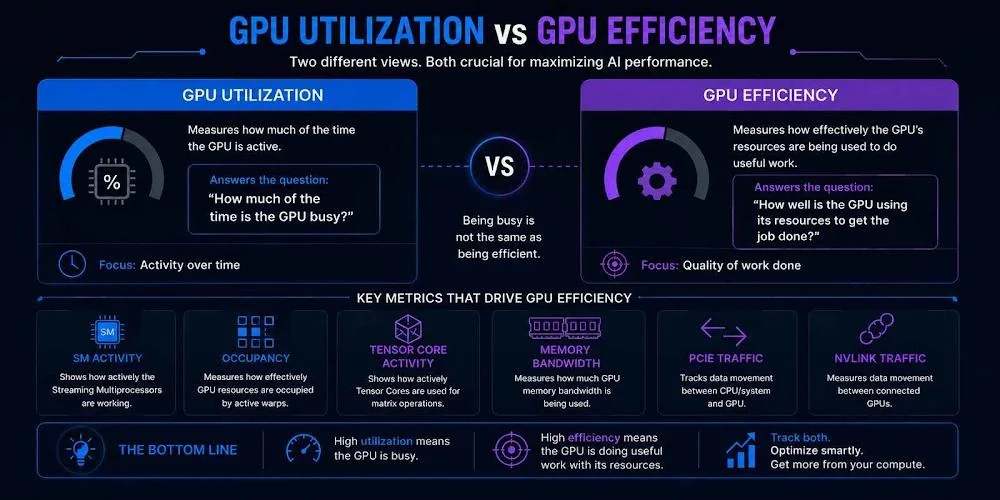
The measurement of GPU utilization is based on the workload or activity of the GPU during a specified amount of time. According to the documentation in the NVIDIA nvidia-smi tool, the term GPU utilization is the percentage of time in the sample period during which one or more GPU kernels were executing.
Basically, it addresses the question: What is the portion of the time that the GPU is busy?
However, there is one crucial point.
While a utilization number shows you that the GPU is being used, it does not necessarily show how productive this usage is.
A GPU could be busy while performing inefficient tasks, waiting for some other systems, or handling a workload in such a way that does not efficiently utilize the resources at its disposal.
This is the main factor to consider in making sure you need additional GPUs, or you should just do a better job using the available capacity.
| Metric | What it measures | What it tells you |
| GPU utilization | How much of the time is the GPU active | Whether the GPU is busy |
| SM activity | Activity of the Streaming Multiprocessors | How actively is the GPU performing compute |
| Occupancy | How effectively GPU resources are occupied by active warps | Whether available resources are being utilized |
| Tensor Core activity | Use of Tensor Cores for matrix operations | How effectively AI/ML acceleration is being used |
| Memory bandwidth | GPU memory data transfer rate | Whether the workload is using the available memory bandwidth |
| PCIe traffic | Data movement between the system and the GPU | Whether data transfers may be limiting performance |
| NVLink traffic | Data movement between connected GPUs | How effectively GPUs communicate in multi-GPU workloads |
The utilization of the GPU and the efficiency of the GPU are thus related but are not equivalent. The GPU may be highly utilized but be constrained by memory bandwidth, communication, or other parts of the computer system.
Why GPU utilization matters more than GPU count
Consider two AI systems.
System 1: 10 GPUs with a 30% utilization rate
System 2: 5 GPUs with a 90% utilization rate
If you consider the number of GPUs alone, System 1 seems like a stronger system.
However, much of the processing capacity of the 10 GPUs goes unused by the workloads in question. In this case, even though System 2 has fewer GPUs, the amount of capacity utilized is much higher.
This is just an illustrative example rather than a concrete computation of actual performance levels.
The basic principle is very straightforward: the number of GPUs gives the capacity of the hardware, and the utilization rate provides the utilization of the same.
In the context of organizations that buy such GPU infrastructures, the above makes a significant difference.
More GPUs can multiply inefficiency
Adding GPUs is justified if the job is parallel enough to make use of them.
However, adding hardware does not mean that the existing problem is resolved.
If you have GPUs sitting idle because of waiting for something, such as data, CPU computation, storage, or communications, adding GPUs would not fix the problem.
When considering adding GPUs from four to eight, the question should be: why can’t the existing four GPUs be made efficient enough?
Why do GPUs have low utilization?
However, low utilization of the GPU does not automatically indicate that the GPU is at fault.
AI computing requires a complete ecosystem for functioning, in which data needs to be transferred to the GPU and CPU; the data must be transferred from storage at a fast pace, and so forth.
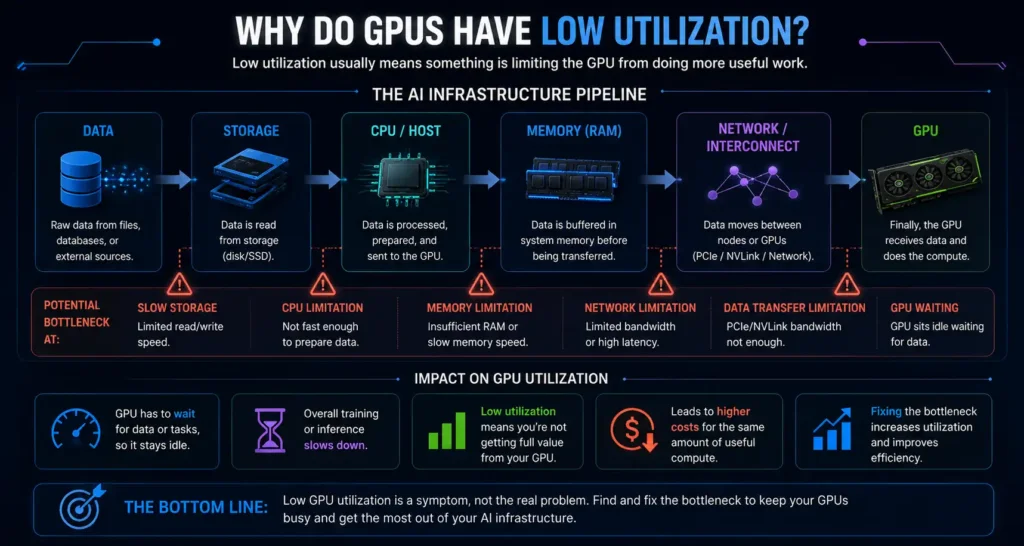
The research conducted by Microsoft Research found about 400 actual deep learning tasks with GPU utilization below 50%. In total, there were 706 cases of low GPU utilization, of which 46% were caused by data processing and 45.18% by deep learning models.
Data pipeline bottlenecks
The AI workloads are capable of processing huge volumes of data. In case the pipeline is not able to feed the information into the GPU fast enough, there could be periods of time when the GPU will have nothing to do but wait.
CPU bottlenecks
The GPU works together with other components of the computer system, so in case CPU operations become a bottleneck, the GPU will have to wait until the next batch arrives. That is why sometimes increasing the computational power of the GPU alone cannot help to speed up the workloads.
Storage and network bottlenecks
The data should go through the system as well, which means that storage throughput, PCIe operations, network communication, and even GPU-to-GPU communications can play an important role in workload efficiency.
Poor workload sizing
However, not all workloads require a high number of GPUs. Small loads, which are scattered among too many GPUs, can lead to poor usage of computing power. It should depend on the particular load, not on the number of GPUs per se.
Scheduling and workload distribution
Also, poor utilization can be caused by inadequate scheduling or distribution of workloads in shared environments where some GPUs can be overloaded while others can sit idle.
Does 100% GPU utilization mean better performance?
No.
One of the main concepts to comprehend concerning GPU utilization is as follows.
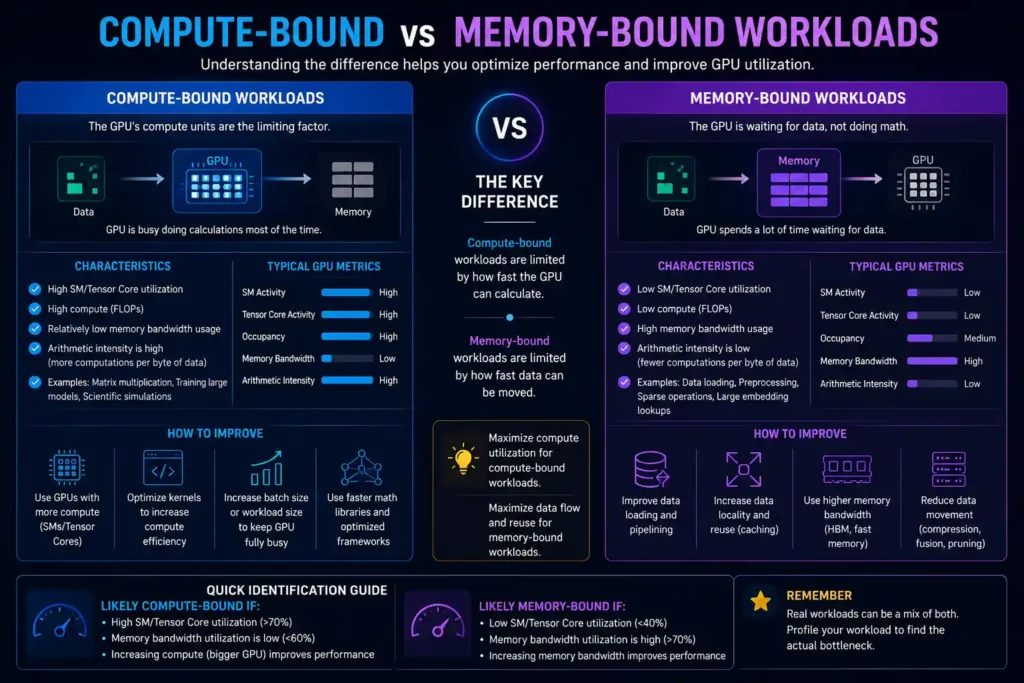
It is possible that a particular GPU demonstrates 100% utilization and, hence, is actively working. However, it does not necessarily mean that this GPU gives its maximum performance.
The fact is that NVIDIA provides users with several metrics apart from GPU utilization metrics in their monitoring tools, and Google Cloud Service differentiates between kernel-running time and overall GPU efficiency.
For instance, just like a factory can operate at full capacity yet produce fewer products than another factory due to its production line inefficiency, so can GPU workloads.
Such measures may include:
- Utilization of GPUs
- Usage of GPU Memory
- Memory Bandwidth
- Activity of SMs
- Activity of Tensor Cores
- Throughput
- Latency
- Time of the workload completion
The distinction becomes particularly crucial in the case of AI workloads, where being busy does not mean being efficient.
Being busy is not the aim here.
The goal should be formulated this way: get the most useful performance out of the purchased capacity of the GPU.
How low GPU utilization increases AI compute costs
Whether you are operating your own hardware or renting one, GPU infrastructure is costly.
The issue with low utilization of GPU is rather straightforward: idle capacity does not turn into free capacity.
Even when a workload uses a GPU for an hour, yet is capable of keeping it productively occupied during that hour only partially, you should account for the cost of GPU-hours.
The way to measure this effect would be:
Effective compute cost = Total compute spend ÷ Useful work done
This is not a standard pricing model for clouds. It represents an approach to understanding the efficiency of infrastructure.
Consider two setups that pay the same for their GPU capacity. The first setup processes a task fast because it uses GPU time efficiently to do computations. The second one wastes some time waiting for data or other resources.
Even though these two systems might be similar in terms of GPU-hour costs, the second one can have higher costs per useful outcome.
Therefore, the most affordable GPU-hour is not necessarily the most affordable way to process AI workloads.
How to improve GPU utilization
The very first thing to do is to identify a bottleneck prior to adding extra hardware.
Right-size your GPU capacity
Do not just add more GPUs, as the workload is slow. Instead, determine first if the GPUs are really the bottleneck.
Improve the data pipeline
Ensure that the data arrives at the GPU quickly enough. This may mean optimizing the data loading, preprocessing, storage access, or batching.
Identify CPU, storage, and network bottlenecks
Consider the system as a whole, not just GPU utilization. If the CPU, storage, or network is slower than the GPU, then upgrading them may provide a better performance boost than adding another accelerator.
Optimize workload batching where appropriate
When multiple inputs can be processed at once for particular types of workloads, correct batching can assist in keeping GPU utilization high. Yet larger batches are not necessarily good since they influence memory usage and latency.
Improve scheduling
In case multiple workloads are using the same infrastructure, better scheduling will allow preventing idleness of certain GPUs and overload of others.
Profile before adding hardware
Firstly, monitoring provides you with an initial point. Use monitoring and profiling to find the bottleneck prior to scaling capacity.
When should you add more GPUs?
Scale up with new GPUs when extra GPU capacity becomes the bottleneck.
- Existing GPUs are being used well enough already.
- The workload can be scaled to more GPUs.
- Extra GPUs can provide extra throughput or reduce completion time.
- Scaling up is worth the costs.
The choice needs to be based on measurement and not on the GPU number only.
If five GPUs spend much of their time waiting for inputs, adding five more will not solve the problem of the data pipeline.
Adding GPUs can make things worse
- Efficient scaling of the load is difficult.
- Data pipelines are the performance bottleneck.
- There aren’t enough CPUs available.
- The limit is reached due to storage or network throughput.
- GPUs spend considerable time waiting for each other.
- The workload lacks sufficient parallelism.
In such cases, optimization can be more beneficial than scaling.
What does GPU utilization mean when choosing a provider
In such cases, GPU usage turns into a compute acquisition problem rather than a performance optimization problem.
When evaluating GPU vendors, it’s tempting to compare the following metrics:
GPU type + hourly rate
However, these two factors alone do not paint the whole picture.
There are many other aspects to consider:
- GPU availability
- Compatibility of the workload with the GPU
- Utilization potential
- Scalability opportunities
- Networking and interconnects
- Memory requirements
- Performance on a particular workload
- Cost of running the workload
A provider that offers cheaper GPU-hours does not necessarily mean that you will spend less money if your workloads take longer or if the infrastructure itself is inefficient.
In this case, a better question would be: How many useful operations can I perform with the capacity that I am paying for?
This is where the distinction lies between GPU price comparisons and compute price comparisons.
For our target audience, ComputeStacker, it becomes crucial when assessing GPU infrastructure since a lower hourly rate seems tempting; however, the actual comparison should be made in terms of efficiency.
Frequently asked questions
What is GPU utilization?
GPU utilization refers to the percentage of time in which a GPU was active for the measurement interval. The NVIDIA GPU utilization is defined as the time interval during which any GPU kernels ran.
What is a good GPU utilization rate?
There is no universal utilization that applies to all workloads. The best utilization depends on the use case, latency constraints, throughput objectives, and other system constraints.
Why is my GPU utilization so low?
Some typical reasons are pipeline inefficiencies, CPU bottlenecks, limited storage or network resources, poor workload design, and suboptimal scheduling.
How can I improve GPU utilization?
The best first step is to determine the bottleneck rather than just throwing more GPUs at it. Start by profiling, then focus on optimizing the data pipeline, the workload design, batching, and scheduling as needed.
Does 100% GPU utilization mean better performance?
No. GPU utilization tells you the degree of utilization but not how efficiently useful work is being done. Memory management, throughput, latency, and workload design are some other factors that matter.
How does GPU utilization affect AI compute costs?
Having low utilization means you might be paying for GPU power that is sitting around unused some of the time or working inefficiently. Higher utilization can lead to doing more useful work using the same infrastructure.
Conclusion
It makes perfect sense to think about increasing the number of GPUs to tackle the problem of low AI efficiency. In certain cases, this might be the correct thing to do.
However, one must learn about their GPU utilization before considering scaling it up.
In case the GPUs that you have at hand operate at optimal levels and your workload is scalable, increasing capacity would help. Otherwise, it will only give you more underused hardware.
More GPUs are not necessarily the future of AI infrastructure.
In some cases, it could mean squeezing more efficiency out of the GPUs that you own.
Get personalised, no-commitment quotes from top AI infrastructure providers in under 2 minutes.