For most teams, GPU availability is one problem. There are actually three, and they fall at various steps.
One: Do you have a quota? Two: Is the hardware available in that region? Three: Can you keep it long enough to complete the task?
Many folks point to the scarcity issue as a problem that actually lies in the unsubmitted quota request. This guide breaks down all three, based on the scheduling policy posted by each of the major providers.
Date last updated: October 21, 2026. We cross-referenced all the provider mechanisms with the official vendor documentation as of that date.
The AI Compute Threshold Report
We analyzed pricing from 150+ GPU cloud providers to find the exact threshold where an AI startup's OpenAI API bill eclipses the cost of a dedicated H100 cluster.
Read the Full ReportKey takeaways
- The allocation of GPUs falls short in three ways: quota, capacity, and time duration.
- Quota refers to a limitation imposed on your account by the administration. Any new project starts from zero.
- Google Cloud states clearly that quota cannot guarantee the availability of the resource.
- The capacity depends on the region you belong to. Shifting to another region would definitely be much better than waiting for the one that you want.
- The duration of the GPUs varies from 7 days to one year depending on how you make bookings.
- Six things that you should consider before depending on the service providers are configuration, region, number, access type, cost, and failure conditions.
Why an H100 is hard to get
Demand exceeded supply. In our article about the 2026 shortage of GPU supply, we discuss what happened to rent costs.
This is the background. The next bit, though, is not in writing: how one acquires access in practice.
GPU availability is three questions, not one
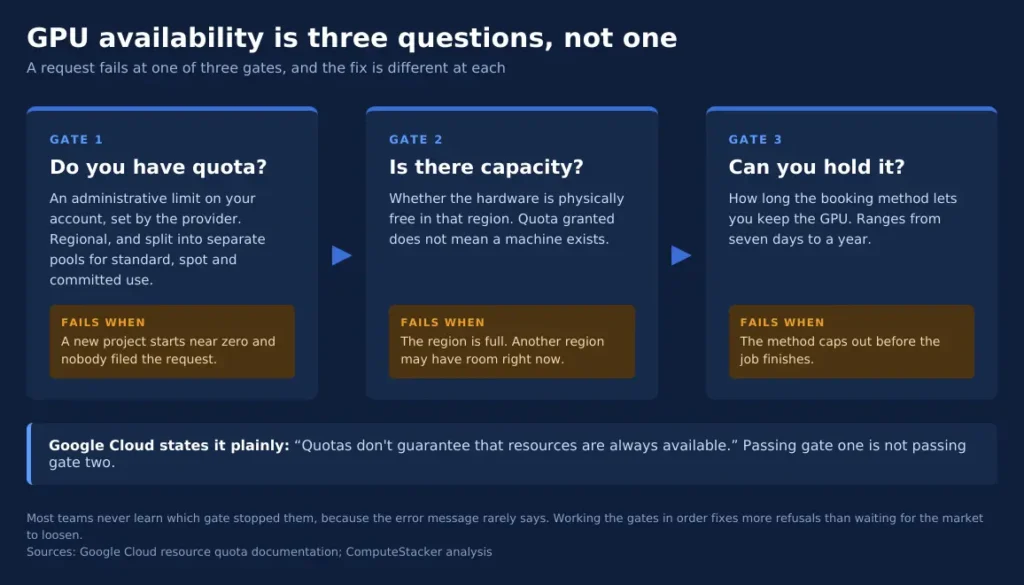
The request falls short at any of the three gates, and the solution varies for each.
Gate one is a quota. Your account has a restriction as to how many GPUs it can run. The provider sets this, and it usually begins at zero.
Gate Two is Capacity. Just because they increased your quota does not mean you can access a machine. They lifted the limit, but they have not provided the hardware yet.
Gate three is time. It is easy to get access to a GPU for an hour. To have access to sixteen GPUs for three weeks is quite another story.
Which gate stopped you will tell you the way to proceed. Most teams never figure it out since the error message doesn’t tell them.
Gate one: do you have quota?
Availability of GPUs depends on paperwork rather than on hardware.
Google Cloud offers very clear guidance on the issue.
In Google Cloud resource quotas documentation, it says, “Your GPU quota refers to the total number of virtual GPUs in all your VM instances in a region”.
Three aspects tend to confuse users.
Quota is regionally based. The quota in one region will not help in any other region.
New projects have a global quota across all regions.
Pools are independent. Standard, Spot, virtual workstation, and dedicated use instances have different quotas. Approval in one pool doesn’t guarantee approval in any other pool.
Reservations also utilise quotas. Running instances and reservations share quotas. That is why a reservation can lock up capacity you wish to use.
Azure similarly divides quotas. As stated in the documentation on the Microsoft website: “Azure Resource Manager enforces two types of vCPU quotas for virtual machines”, standard and spot.
One trap deserves to be mentioned. Free Trial accounts in Google Cloud have no way of requesting a change to their quota. No trial account will get an H100.
Gate two: is there capacity in that region?
This is a sentence that no customer has ever seen before. It is stated quite explicitly in the Google Cloud official documentation that “quotas do not guarantee the availability of resources.” This one sentence encapsulates all the problems involved.
Availability has to do with both physicality and locality. There may be an area that is at its limit in the morning but is not in the afternoon, whereas another area that is just two regions away may be limited at the same time.
Consider the implications for planning purposes. There may be a team waiting for three weeks before they get their chosen region, while another team would have started working in another region two regions away three weeks ago.
So, one should prioritise the region rather than consider it last. Local markets have very different dynamics. Please see our guides for GPU cloud computing in India and GPU cloud computing in Sydney.
Listed is not the same as deployable
Provider sites list the products offered by the organisation; however, they do not have anything to do with how much of those products the company can offer to you at any point in time. This difference gets greater as the demand increases.
There may be a card listed within their catalogue; however, there could be no cards left for new customers since all the cards have been reserved.
The card may represent the product perfectly; however, nothing is said about the queue of customers for that product.
Gate three: how long can you hold it?
Time is another factor associated with GPUs, and the booking methods are a lot different from what people thought. Your booking method determines how long before the start date you must book, the maximum duration of your booking and how much you will pay.
| Method | Reservation needed | How long you hold it | You pay for |
|---|---|---|---|
| On-demand | No | Until you stop it | Time running |
| Spot | No | Until preempted | Time running, at spot rates |
| Google Cloud flex-start | No | Up to 7 days | Time running |
| Google Cloud calendar mode | Yes | Up to 90 days | The whole window, used or not |
| AWS Capacity Blocks | Yes | Booked up to 8 weeks ahead | The whole block |
| On-demand reservations | Yes | Your chosen window | The whole window |
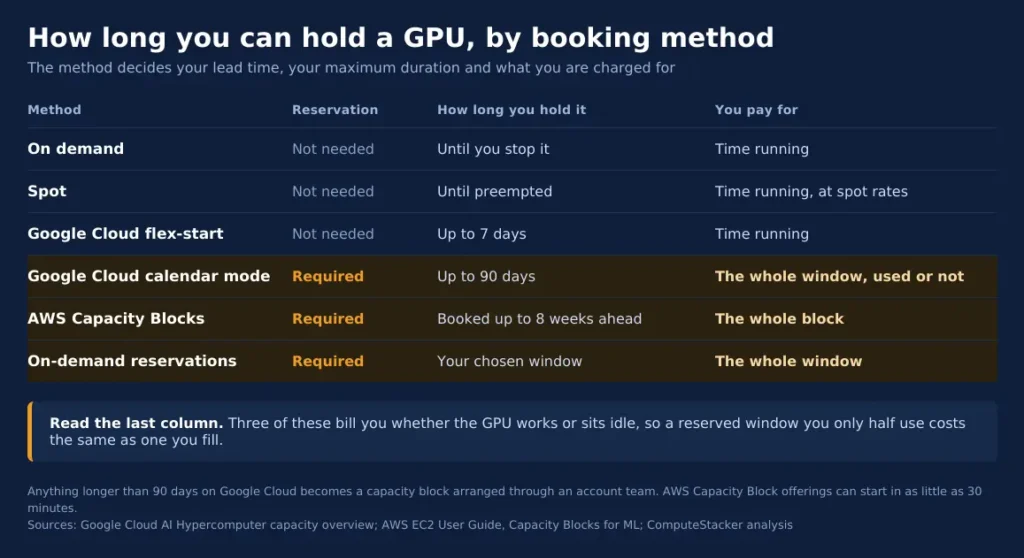
Note the two options on the right side of the table below, which charge you no matter whether the GPU does useful work or sits idle.
That skews the economics of a training job. A partially used reservation is just as expensive as a fully utilised one.
Google Cloud GPU availability: quota, regions and calendar mode
Google Cloud offers the maximum variety of ways to provision, and they are not always easily predictable.
On-demand provisioning needs nothing more than the regular GPU quota. If the system can allocate these resources, then it does so instantaneously.
Flex-start doesn’t need any reservation, and it uses the preemptible quota. From the official capacity documentation, we find that “Once capacity is available, your VMs will run for up to seven days.”
In the case of the Calendar provision, it reserves capacity for the future up to 90 days. The customer pays for all the time, no matter whether it is used or not. It doesn’t use any quotas.
Future reservations that are typical ask for a certain date. The quota should also be available when making the reservation as well as during submission of the request.
After 90 days, it becomes a capacity block, which has to be managed by the account team. That means there will be no console click, but a sales conversation.
Choose based on the kind of work involved. A seven-day trial works for the flex-start; the dated trial run works for calendar mode, and serving works for reservations.
It is very expensive whether in terms of over-reservations or under-reservation. Over-reservation will mean paying for unutilized hardware, while under-reservation will cause the work to be killed.
How AWS and Azure differ
The AWS implementation of the same concept is called Capacity Blocks for ML. The EC2 documentation mentions them as a way to “reserve GPU-based accelerated computing instances for a future date”.
Two numbers are important. You may set a starting time “up to eight weeks in advance”. Some offerings can start “in as soon as 30 minutes”.
Capacity blocks work with P4, P5 and P6 series, as well as with Trainium instances. They expire at 11:30 UTC, while AWS terminates the instances at 11:00 UTC on the last day.
Remember this limitation when planning your job. If your task requires all the allotted time, you have to checkpoint before the termination process starts.
While Azure clearly describes their quota system, there is little information about GPU capacity reservations. Consider Azure offer as requiring negotiations with your account team.
Neoclouds work differently
Specialised GPU vendors do not use quotas at all. There is no limit to be raised, since the issue is just whether they have the machines.
This makes them fast when there is capacity available and slow when there is none. Either there is inventory, or there is a waiting list.
Commitment is the cost here, with many requiring a minimum commitment period for dedicated clusters, trading off quick access with the duration of the contract.
Lead times are also different by an order of magnitude, with some vendors offering a single machine in minutes and a multi-machine cluster in days.
Request the lead time of your specific configuration, and not the one of their fastest machine. This will be the difference between success and failure.
The H100 provider list will provide you with the current availability of the H100 card from the vendors, and the H100 pricing table with their prices.
Trackers tell you less than you think
Trackers of third-party GPU availability are common. They are very useful in providing an approximate picture of the market.
However, trackers are not official sources. What a tracker shows is what a provider has published. This does not mean that they will provide your account in your region today.
Use a tracker as a preliminary tool that helps to make up the list of whom to contact and to verify the information received from the provider.
This verification is the part that people tend to overlook. This is the only part that really matters.
Another limitation of trackers is worth mentioning. Trackers do not have access to your account data, meaning they do not know about your quota and entitlements to regions.
Two different teams can refer to the same tracker and receive different information from the same provider on the same day.
How to verify a GPU is really available
These are the six questions to ask before you believe any statement regarding GPU availability. Put into writing, they will take ten minutes for a service provider to answer.
| Field | Question to answer |
|---|---|
| Inventory status | Is this exact configuration deployable now, or merely listed? |
| Region | Which region or data centre can serve the workload? |
| Quantity | Can they supply the GPUs together, in one node or cluster? |
| Access method | Immediate provisioning, request-based allocation, or reservation? |
| Total cost | Hourly rate plus storage, networking, egress and any minimum term. |
| Reliability | What happens if capacity is delayed, withdrawn or deployment fails? |
Quantity is the one that catches many people out. While eight GPUs distributed over a region may be eight GPUs available, they are not necessarily in one node, which is required for distributed training.
What to do when the answer is no
Five steps, more or less in ascending order of cost involved. And none of them involves any relaxation of the market.
Change regions. This is the least costly way out and often the quickest too. Capacity is regional, so saying no in one place means nothing in another.
Change GPU. A100S or L40S could do the job. Here is our sizing guide for the GPUs needed for the model.
Reduce the number of GPUs. It’s easier to procure fewer GPUs running for a long time instead of many running short.
Spot GPUs with checkpoints. Spot capacity keeps getting released. We have our own guide to spot interruption engineering.
Move to a neocloud. There is no quota queue and often inventory that the hyperscalers don’t have.
Try them in order, not just one of them. Each one increases the chances of using real hardware.
Keep a record of what you asked
The other one will save you more time than you might expect. Every time you inquire, be sure to record the date, the configuration, the region, and the answer.
Capacity changes every week, so even if last month’s note is not helpful. Keeping track will tell you who you need to ask again first.
This practice will help you defend yourself in case of a dispute. A written promise is harder to back out of than a verbal one.
FAQ
Can I get an H100 on a free trial account?
Not on Google Cloud. Its documentation states that Free Trial accounts cannot request a quota change, and without quota you cannot launch a GPU.
Plan on a billing-enabled account from the start. The trial is for learning the console, not for training runs.
Does raising quota cost anything?
Raising a limit is a request, not a purchase, so the limit itself carries no charge. You pay only for what you then run.
Confirm this with your provider before planning around it, since terms differ and can change.
How far ahead should I book a training run?
Match the method to the length. AWS Capacity Blocks reach eight weeks out, and Google Cloud calendar mode covers up to 90 days.
Beyond 90 days you are negotiating a contract, so start that conversation earlier than feels necessary.
Is a different region really better than waiting?
Usually, because the two gates are independent. Waiting fixes nothing if the hardware is simply not in that region.
Check latency and data residency before you move. Our explainer on what a GPU hour is covers the cost side of running further from home.
Why does my quota request keep getting rejected?
Providers do not publish their approval criteria, so no honest answer covers every case. Ask the provider directly for the reason.
One thing helps in general. Ask for a specific GPU model in a specific region, rather than a large blanket increase.
Conclusion
Work the three gates in order. Check your quota first. Then ask whether the region has capacity, and match the booking method to the length of the job.
Most refusals are fixable at the first or second gate without waiting for the market to loosen.
When you know what you need, compare who currently has it on the H100 provider page.
Get personalised, no-commitment quotes from top AI infrastructure providers in under 2 minutes.