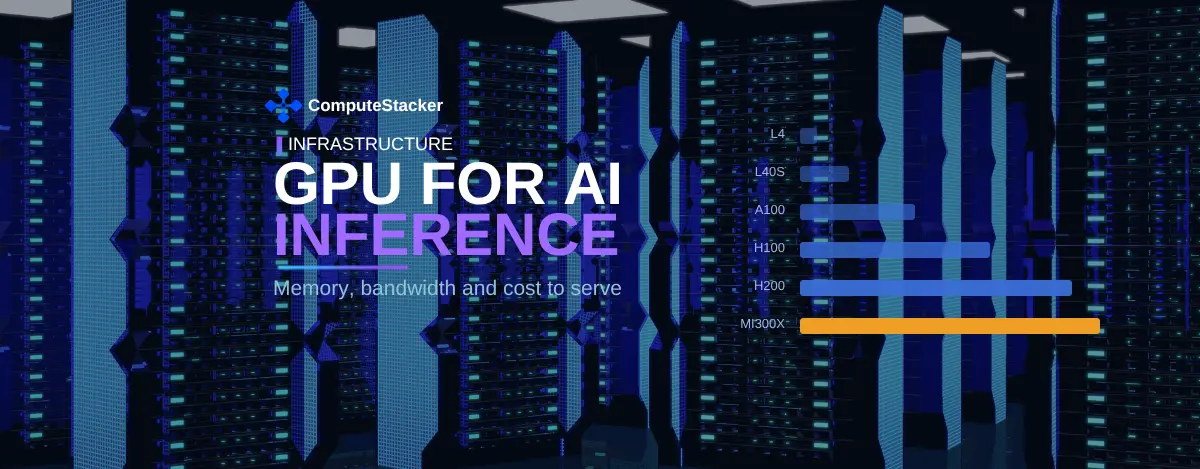
Two factors determine the GPU for AI inference tasks. The memory size determines if the model even runs. The memory bandwidth determines how quickly it responds.
The computing power plays a much smaller role in the choice of GPU for AI inference than many buyers anticipate. Both H100 and L40S can fit an 8B model, but the H100 is four times quicker at producing tokens.
This cheat sheet explains why. It compares six GPUs based on the relevant specifications and provides three numbers to consider before purchasing.
The team extracted the specifications from vendor datasheets and verified them on October 16, 2026.
The AI Compute Threshold Report
We analyzed pricing from 150+ GPU cloud providers to find the exact threshold where an AI startup's OpenAI API bill eclipses the cost of a dedicated H100 cluster.
Read the Full ReportLast updated: October 21, 2026. Memory sizes are in decimal gigabytes, as stated by the vendors.
Key takeaways
- Choose a GPU for your AI inference use case based on memory first. Memory capacity acts as a gateway, not a slider. Without sufficient memory, there will be no point in considering anything else.
- Bandwidth sets the speed limit. Each token load needs to go through a complete sweep of the weights.
- The H200 offers 141 GB of memory and 4.8 TB/s bandwidth, whereas the H100 SXM provides only 80 GB and 3.35 TB/s of bandwidth.
- Time to first token, inter-token latency, and number of tokens per second are three measures you need to consider.
- Batching improves overall throughput but degrades performance per user. Choose what you are optimising for.
- Software optimisation can increase throughput by 2 to 4 times on the same GPU.
Why inference needs a different GPU from training
Training and Serving Stress the GPU Differently. An AI Inference GPU optimises for different reasons than a training GPU. Buying a GPU by applying optimisation principles for another would be foolish.
Training happens in huge batches for long hours. It depends upon pure compute and interconnect performance, and is tolerant of latency since no one expects immediate results from any single iteration.
Serving is the complete opposite. User requests come in individual batches, and users expect immediate responses from each batch. This process is also continuous rather than happening within a specific time window.
Also, memory requirements in both processes differ in nature. Memory required for training involves gradients and optimizer states, while requirements for serving consist of weights and caches, as explained in our article on VRAM requirements for models.
The outcome of all this is clear enough. A GPU that performs well at training can perform badly at serving, and vice versa.
Prefill and decode: a GPU for AI inference does two jobs
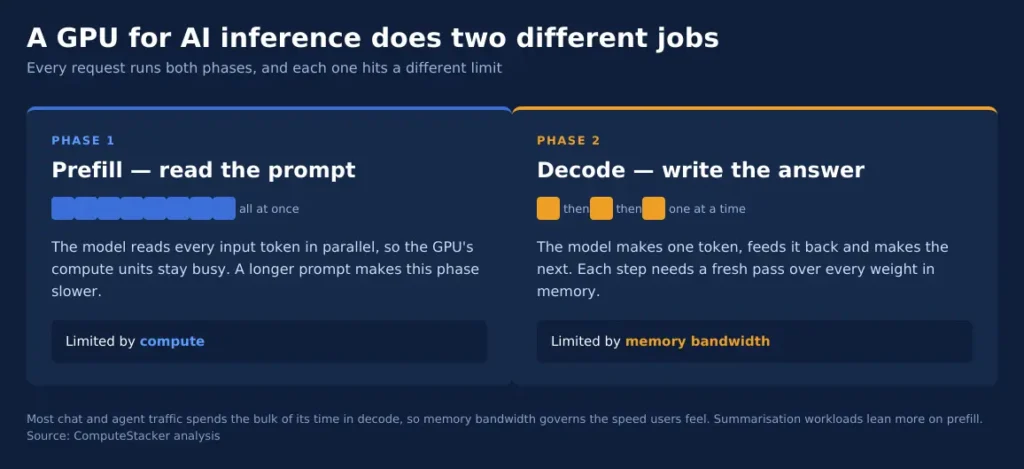
Each request runs in two phases, and each stresses a different part of the GPU.
Prefill processes your prompt. The model consumes all the input tokens at once, and that’s parallel, so the computation units of the GPU stay fully utilised. The longer your prompt, the longer your prefill phase will be.
Decode outputs the result. The model consumes one token, passes it back, consumes another token, and so on. Each step requires a new pass through the model weights.
This determines everything else. Computation defines how well prefill will perform, while memory bandwidth determines how well decode will perform.
Most of the chat and agent workloads spend most of their time in the decode phase, so memory bandwidth determines user experience, not teraflops.
The ratio changes based on the workload. Summarization tasks consume lots of text to produce less text, and that puts more emphasis on prefill.
Before you choose a specific model type for your use case, check how many input tokens you get per one output token.
What limits inference speed
Consider a scenario where we need to generate one token. The GPU has to fetch all the weights stored in memory before generating the output.
A 70B model using FP8 format takes up 70GB worth of memory. The H100 SXM has a throughput of 3.35TB/s, as specified on the NVIDIA H100 page.
The ratio gives us a rough estimate of the theoretical limit:
Tokens generated per second ≈ memory bandwidth ÷ weight memory
For the 70B model on one H100 GPU, this works out to be approximately 48 tokens per second for one request. Real-world systems would have lower numbers, as cache access and runtime operations also use memory bandwidth.
Remember to take this number as a theoretical limit instead of a benchmark. We have done the math on published specifications above.
GPU for AI inference compared
Here are six cards with the two specifications that define the serving performance. Our arithmetic represents our ceilings, using the formula presented above.
| GPU | Memory | Bandwidth | 8B FP16 ceiling | 70B FP8 ceiling |
|---|---|---|---|---|
| NVIDIA L4 | 24 GB | 300 GB/s | about 19 tok/s | does not fit |
| NVIDIA L40S | 48 GB | 864 GB/s | about 54 tok/s | does not fit on one |
| NVIDIA A100 80GB | 80 GB | 2,039 GB/s | about 127 tok/s | about 29 tok/s |
| NVIDIA H100 SXM | 80 GB | 3,350 GB/s | about 209 tok/s | about 48 tok/s |
| NVIDIA H200 | 141 GB | 4,800 GB/s | about 300 tok/s | about 69 tok/s |
| AMD Instinct MI300X | 192 GB | 5,300 GB/s | about 331 tok/s | about 76 tok/s |
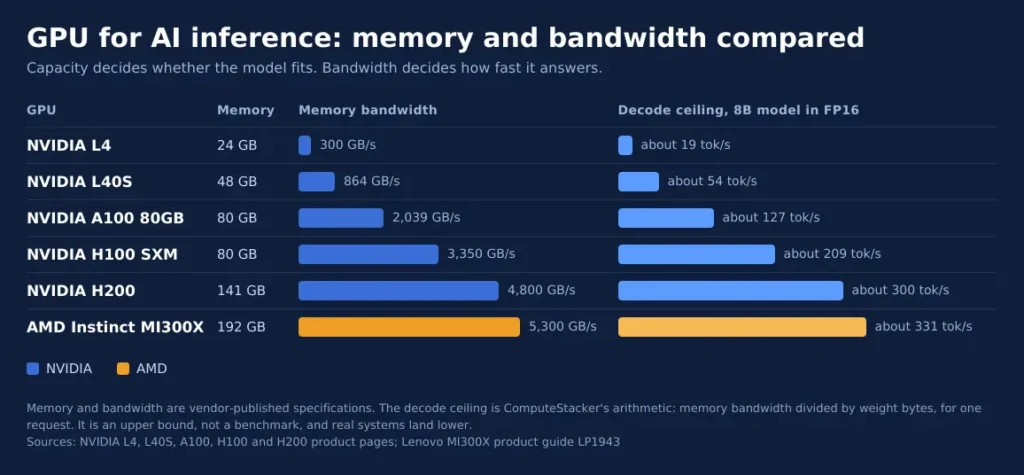
Data taken from vendor pages: NVIDIA L4, NVIDIA L40S, NVIDIA A100, NVIDIA H100 and NVIDIA H200. We took the data for the AMD processor from the Lenovo MI300X instructions.
We can spot two trends here. First, L4 and L40S processors have sufficient memory to work with small models, but much lower bandwidth. Second, the designer designed them for light traffic, not fast chat.
H200 and MI300X processors redefine the situation at the top end with additional memory capacity to handle long contexts and large batch sizes. The following sections will discuss further.
As NVIDIA claims, H200 executes Llama2 70B inference 1.9 times faster than H100 and GPT-3 175B 1.6 times faster. These are figures provided by the vendor and labelled as preliminary.
Which GPU suits which model size
Match the GPU for AI inference to the model first, then validate the traffic.
Up to 8B models. These fit easily into an L4 or an L40S. Select the L4 for batch processing, while an L40S would do for user-waiting jobs.
Models in the range of 13B to 34B. These fit either an L40S or A100 in FP16. Quantising to FP8 brings a 34B model on an L40S, along with the cache space.
Around 70B models. You need an H100 or H200, or even two smaller GPUs. FP8 reduces the memory requirement by half and allows a 70B model in 80 GB on a single GPU.
Models of size 405B and above. Plan a full node. Our VRAM sizing guide runs the math for you in each case.
Models of images, speech and embeddings. These are much smaller than LLMs. An L4 suffices in many cases and comes with a huge price difference compared to an H100.
Here’s how it plays out. Consider that you have an obligation to supply a 70B assistant to a support team. Your latency goal is 30 tokens per second per user.
Since the maximum rate of the A100 is around 29 tokens per second, it falls short of the target even without considering cache or runtime effects. The H100 is around 48 tokens, and the H200 is around 69.
Just this one piece of information eliminates one candidate that people would consider based on memory alone.
The comparison is not what it used to be. Not price and teraflops, since these do not measure a latency target that the user experiences.
How concurrency changes the GPU you need
Size isn’t all that goes into sizing a model. The number of people served concurrently is the other factor.
Each concurrent request contains a key-value cache for the GPU, which increases with every token and exists side-by-side with the model weights.
Thus, two models running concurrently could require different GPUs since one serving four users with short prompts could fit where another serving forty with long prompts doesn’t.
This is where the H200 and MI300X make their money; the additional cache size allows for more concurrent requests rather than a larger model.
Do the math for your own cache requirements ahead of time; our VRAM sizing calculator explains the math and provides per-model values.
One simple heuristic: always allow headroom. Prompt length varies, and the GPU that’s filled up won’t be able to handle the longer prompt.
The three numbers to measure
Vendor specs filter out the options. Your own tests will decide what GPU for AI inference you end up buying.
Time to first token is “time from query submission until it receives the first token,” according to NVIDIA’s benchmarking specification document. It includes queuing, prefill, and network latency. This determines the responsiveness of your product.
Inter-token latency is the average interval between subsequent tokens. Since the same document calculates this metric from the time of receiving the first token, it applies to the decoding step only.
Tokens per second come in two variants. On a per-user level, it measures how fast a reply stream flows from a single user. On a per-system level, it measures total GPU performance.
Make a decision ahead of purchase. The chat product relies on the first two metrics, while a batch pipeline cares only about the third.
Batching trades per-user speed for total throughput
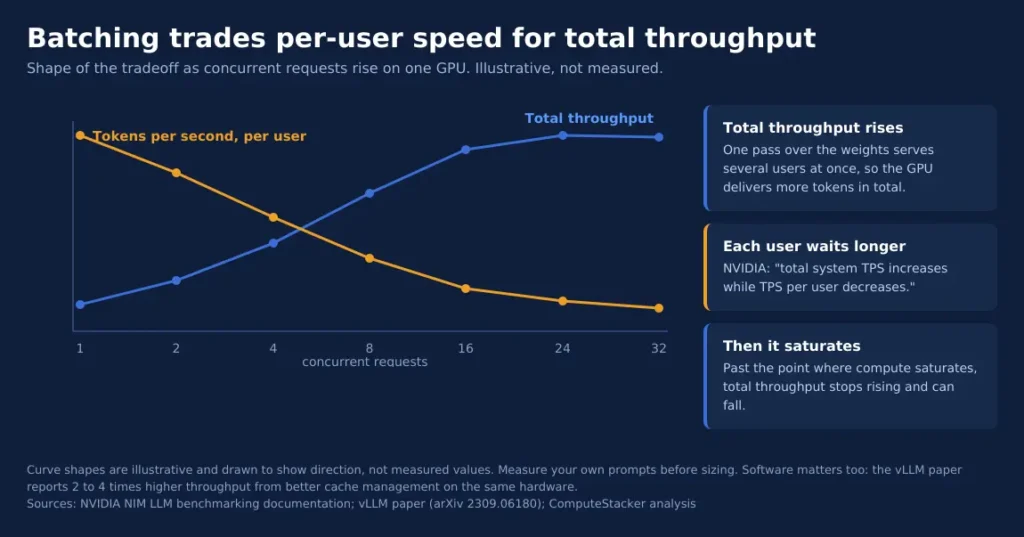
Bundling engines bundle concurrent requests such that one weight pass serves many users. This has a trade-off.
According to NVIDIA’s documentation, “as the number of concurrent requests grows, total system TPS grows while TPS per user diminishes.”
The same source goes further to set an upper limit. Total throughput will increase up to the compute saturation of the GPU, after which it will decrease.
So a larger batch does have a price. Users have to wait longer to get their tokens processed by the GPU.
Even software is as important as hardware in this matter. The vLLM paper shows that through better cache management, there is 2-4 times higher throughput using the same GPUs.
That is why benchmarking beats specifications. Our article on why utilisation is important discusses the downside of not doing so.
Software changes the answer as much as hardware
There could be a huge difference in throughput between two teams of identical cards. The serving stack is responsible for the vast majority of that discrepancy.
The levels of continuous batching, paged attention, and quantisation support differ between engines. In the vLLM paper, the cache management was responsible for a factor of 2 to 4 increase in throughput.
Consider three aspects before choosing a card for your engine. Does it work with your engine, support your quantisation format, and work with your model architecture?
It is especially true for non-NVIDIA cards, which have delayed support for fewer models.
What it costs to serve
Price the GPU for AI inference based on GPU-hours, like we explain what a GPU-hour is in our article.
What matters is the cost per token, not cost per hour. Calculate the cost per token by dividing the hourly price by the measured tokens per second; usually, the cheaper GPU loses here.
Let’s take the 8B model. While an L4 GPU costs a quarter of an H100 GPU in terms of hourly price, the former generates about a tenth of tokens compared to the latter. With consistent load, the H100 GPU will be cheaper in terms of cost per token.
If the load is low or inconsistent, then the picture changes drastically. An idle GPU charges for one hour anyway, so the serverless solution gets its premium.
The point of intersection depends on the utilisation rate of your GPU. The comparison of bare metal and serverless follows the same principle.
Power is the other cost people miss. Two cards at the same hourly rate can differ in tokens delivered per watt. Our piece on tokens per watt covers that gap.
Utilisation decides which way the sum falls. A card busy 80% of the day amortises its rate across far more tokens than one busy 10%.
Watch the extras too. Storage, egress and idle time all add to the bill. Our guide to hidden GPU cloud costs lists where they appear.
For current rates, see our H100 pricing breakdown. To compare providers for the card you choose, use the inference provider comparison.
FAQ
Can I use a consumer GPU in production?
Check the licence before the specs. NVIDIA’s GeForce licence states the software “is not licensed for datacenter deployment”, with an exception for blockchain processing.
Rented data center cards avoid the question entirely. For a lab or a prototype, consumer hardware is fine.
Does more memory always mean faster serving?
No. Memory capacity decides what fits, and bandwidth decides how fast it runs.
The L40S and A100 show the gap. The A100 holds less than twice the memory but moves more than twice the bandwidth.
Should I quantise to fit a smaller GPU?
Often yes, with a test. FP8 halves the weight footprint against FP16 and can move a model down a tier.
Accuracy is the tradeoff. Run your own prompts at the lower precision and compare the outputs before you commit.
How many users can one GPU serve?
That depends on your context length, because the cache grows with every token held. The arithmetic is in our VRAM sizing guide.
As a starting point, measure your real prompts rather than estimating. Prompt lengths vary more than most teams expect.
Does AMD hardware work for serving?
On paper it competes well. The MI300X carries 192 GB at 5.3 TB/s, more of both than the H200.
Software support is the question to ask. Confirm your serving engine and model run on the card before planning around it.
How often should I re-check the GPU choice?
Re-check whenever the model, the context length or the traffic shape changes. Each one moves the memory and bandwidth you need.
A new model version can also change the layer count and cache size. Rerun the numbers rather than assuming the old card still fits.
Conclusion
Start with capacity. A model that does not fit will not serve at any speed. Then rank the cards that do fit by memory bandwidth.
Measure time to first token and inter-token latency on your own prompts. Then decide whether you are selling speed or volume.
Then compare what providers charge for the card you chose on the H100 provider page.
Get personalised, no-commitment quotes from top AI infrastructure providers in under 2 minutes.