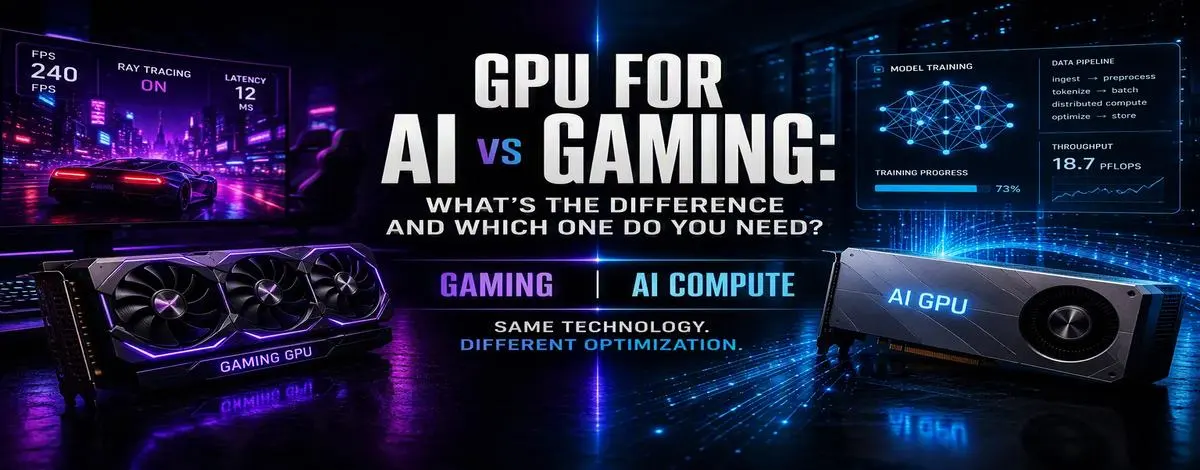
GPU for AI vs gaming is less about two completely different types of technology and more about how each GPU is optimized for its workload. The gaming GPU will emphasize speed, real-time graphics, and fast frame rates, whereas the AI GPU emphasizes computational performance, high memory, and bandwidth. The awareness of these distinctions will help you choose the appropriate GPU without wasting money on unnecessary hardware.
Key Takeaways
- Gaming GPUs are mainly optimized for real-time graphics, fast frame rates, rendering, and gaming.
- Artificial intelligence GPUs are mainly optimized for matrix calculations, AI acceleration, high memory, and computing power.
- It is possible to use gaming GPUs for AI applications, specifically local AI, inference, experimentation, image creation, and training.
- An AI/data center GPU is not just a “better gaming GPU”; it is optimized for a different type of workload.
- If you need gaming along with local AI, a consumer GPU makes sense rather than an AI/data-center accelerator.
- In case of heavy-duty AI training and inference, an AI/data center GPU is optimized for that.
- VRAM, memory bandwidth, AI acceleration, software support, and the size of the workload matter, not just the power of the GPU itself.
GPU for AI vs Gaming: What’s the difference?
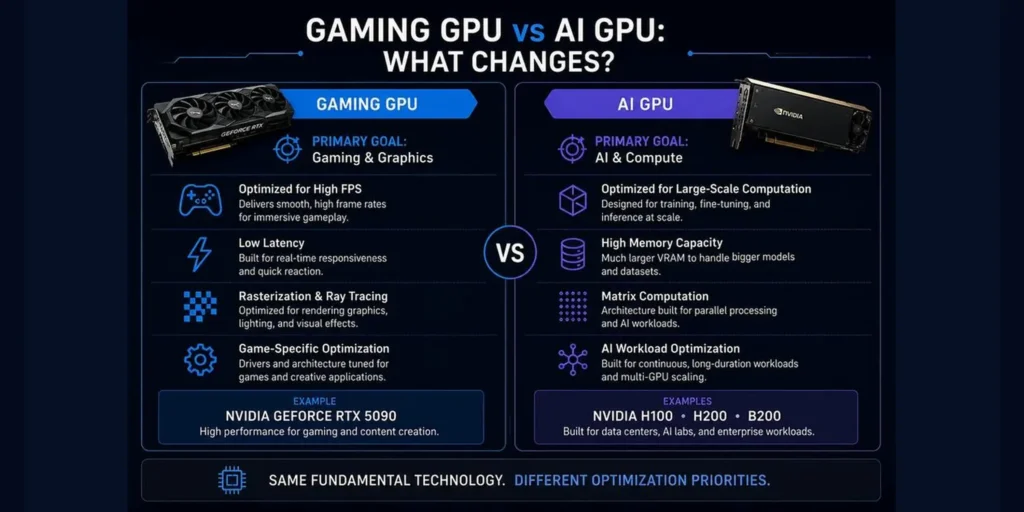
In general, the reason behind their differences lies in the fact that each of these GPUs is built for a certain purpose. A gaming GPU is built for quick frame rendering, whereas an AI GPU is built for performing heavy parallel computing tasks.
| Factor | Gaming GPU | AI GPU |
| Primary workload | Gaming and graphics | AI/ML and compute |
| Main priority | Frames, rendering and latency | Compute throughput and efficiency |
| VRAM importance | Important | Often critical |
| Memory bandwidth | Important | Extremely important for many workloads |
| AI acceleration | Increasingly common | Core design priority |
| Ray tracing | Major feature | Generally not the priority |
| Gaming optimization | Excellent | Often secondary or irrelevant |
| AI training | Possible on many consumer GPUs | Primary use case for dedicated accelerators |
| AI workloads | Good for many local workloads | Major use case |
| Typical environment | Desktop/laptop | Server/data center |
| Best fit | Gamers and mixed-use users | AI teams and compute-heavy workloads |
What is a gaming GPU?
A gaming GPU has real-time rendering in mind. Every time you play a video game, the GPU performs geometry operations, textures, lighting, shadows, reflections, and other tasks, and it does them fast.
With a render speed of 120 frames per second, you get about 8.3 milliseconds to complete each frame. Hence, latency and quick bursts become key.
The AI Compute Threshold Report
We analyzed pricing from 150+ GPU cloud providers to find the exact threshold where an AI startup's OpenAI API bill eclipses the cost of a dedicated H100 cluster.
Read the Full ReportCurrent gaming GPUs are not bound to traditional graphics anymore. The newest generation of NVIDIA GeForce RTX GPUs uses ray-tracing capabilities and Tensor cores in combination with DLSS and Reflex technologies. That is why the old stereotype of “gaming GPU = graphics only” becomes less and less relevant.
What is an AI GPU?
An AI GPU is focused on highly parallel compute loads for artificial intelligence and machine learning. AI models run huge amounts of calculations, especially matrix calculations.
At the same time, AI workloads can also require memory resources in a way totally different from gaming workloads. In case a model does not fit the amount of available VRAM, nothing helps.
- VRAM capacity
- Memory bandwidth
- Tensor/AI acceleration
- Compute precision
- Multi-GPU communication
- Sustained workload performance
- Reliability
- Software ecosystem
Data center accelerators are built to meet these demands.
Gaming GPU vs AI GPU: The key hardware differences
1. VRAM
In the case of gaming, VRAM stores all texture, assets, frame buffer, and graphics-related data. However, when talking about workloads for AI, the VRAM decides whether the model runs or not. Even the best GPU in terms of compute performance cannot execute the model if it doesn’t have enough VRAM. For instance, the VRAM of the NVIDIA GeForce RTX 5090 is 32 GB, whereas that of the NVIDIA H100 and H200 is 80 GB and 141 GB, respectively. The VRAM capacity is of paramount importance when training huge AI models that need sufficient VRAM to reside on the GPU only.
2. Memory Bandwidth
Data movement in memory is enormous in the case of AI tasks. Hence, the bandwidth is critical when comparing GDDR memory in consumer GPUs with high-bandwidth memory in dedicated data center accelerators. As an illustration, the RTX 5090 employs GDDR7, but the H100 and H200 leverage the fast HBM type. The disparities in memory technologies enable special AI GPUs to process massive amounts of data effectively under intensive AI loads.
3. Tensor Cores and AI Acceleration
Modern GPUs used by consumers feature AI acceleration hardware. The GeForce RTX 50 series from NVIDIA comes with fifth-generation Tensor Cores, which explain why a gaming GPU is suitable for AI. For instance, the RTX 5090 incorporates fifth-generation Tensor cores that can help speed up AI-related processing tasks while offering gaming features as well. On the other hand, the H100 and H200 have more memory capacity than the RTX 5090, and therefore, they are better for AI workloads.
4. Latency vs Throughput
Latency and frame response are critical in gaming. Throughput is usually more important with AI workloads.
Can you use a gaming GPU for AI?
| Short answer: Yes. Modern consumer GPUs can run local LLMs, image generation, AI experimentation, inference, development workloads, and some smaller fine-tuning and training workloads. |
This critical thing to note is that just because you have an AI workload does not mean you necessarily need a GPU from the data center category. For a developer testing some local models, a top-of-the-line gaming GPU would be a good choice.
And here comes the interesting part: the market of GPUs for AI among consumers.
Can an AI GPU be used for gaming?
| Short answer: Technically possible in some cases, but usually not the practical choice. Dedicated data-center AI GPUs are designed around compute, AI, HPC, and infrastructure workloads rather than graphics. |
Here we have the confusion of capabilities with purposes. Enterprise accelerators can be very powerful but are not suitable for any gaming needs.
Consumer GPU vs Dedicated AI GPU
It is not always the question of “gaming GPU or AI GPU” but rather the question of “consumer GPU or dedicated accelerator”. The latter would fit well into the category of powerful gaming devices with good AI features.
Dedicated AI hardware looks more attractive when we talk about heavy model training, production inference, big models, multi-GPU setups, long-term compute tasks, enterprise AI hardware, and high utilization.
So, which GPU do you need?
| Your workload | Best GPU category |
| 1080p/1440p gaming | Consumer gaming GPU |
| High-end 4K gaming | High-end consumer GPU |
| Gaming + AI experimentation | High-end consumer GPU |
| Local LLMs | Consumer GPU with sufficient VRAM |
| Image generation | Consumer GPU |
| Small-model development | Consumer GPU |
| Smaller fine-tuning workloads | High-VRAM consumer GPU or cloud GPU |
| Large AI training | Dedicated AI/data-center GPU |
| Large-scale inference | Dedicated AI/data-center GPU |
| Multi-GPU training | Data-center GPU infrastructure |
| Enterprise AI workloads | Dedicated AI infrastructure |
What about gaming + AI?
For someone who enjoys gaming late at night but is also looking to tinker with local LLMs, image generation, and AI in general, then maybe a single consumer-grade GPU could just fit the bill.
- If you are experimenting, go for a consumer GPU.
- If you are working with local models, think about VRAM.
- If you are fine-tuning larger models, think about high VRAM GPUs or cloud GPUs.
- If you are training large models, then you will need dedicated AI hardware.
The GPU you need isn’t always the most powerful GPU
The pitfall here is believing that whatever the fastest accelerator is, must be the best buy. A GPU is only “better” if it aligns with the workload.
| Workload-first rule Ask what bottleneck you are trying to remove. Frame rate points toward gaming performance. Model memory points toward VRAM. Distributed training points toward GPU-to-GPU communication. Cost and availability may point toward cloud rental. |
This is clearly a better way of hardware selection than merely trying to find the “best GPU.”
Buying vs renting a GPU for AI
But before deciding whether you should get an AI GPU or a gaming GPU, there is one more thing to consider: whether you really need a GPU.
Workload for AI tasks can be highly sporadic. This means that you may require several GPUs for the current training session, but nothing next time. Cloud GPU renting means paying per hour for what you use rather than buying the hardware itself.
Here, the cost structure will depend on your utilization, GPU availability, duration of contracts, provider pricing, storage, and other infrastructure-related fees.
| ComputeStacker angle When expensive AI capacity is needed only occasionally, renting can turn a large upfront hardware decision into a workload-specific operating expense. |
The simple decision framework
Choose a gaming GPU if:
- Gaming is your first job.
- Graphics performance must be low-latency.
- You require ray tracing and other game-specific technologies.
- You also need to try AI from time to time.
| Example: Since gaming is the main function while AI is just an additional task, a single graphics card like the RTX 5090 will be enough to run both without the need for data center hardware. |
Choose a high-end consumer GPU if:
- You want to have games and AI in one device.
- You run local LLMs.
- You generate images locally.
- You either develop or experiment with AI.
- VRAM is an important limitation.
| Example: If you need a single computer to be able to game, use local LLMs, generate images, and experiment with AI, a powerful GPU like the RTX 5090 would make sense. |
Choose a dedicated AI GPU if:
- You’re training large models.
- You are executing real production inference.
- You require huge memory capacity.
- You’re building multi-GPU infrastructure.
- The GPU usage is high enough to warrant a dedicated memory capacity.
| Example: When it comes to training big models or inference in production, or if there are difficult multi-GPU loads, accelerators such as H100, H200, and B200 are better options. |
Rent instead of buying if:
- Your workload for AI is temporary.
- You require expensive GPUs infrequently.
- You require more GPUs than your local machine can support.
- You wish to experiment without buying hardware.
- You require access to data center accelerators without acquiring the infrastructure.
FAQ
What is the difference between a gaming GPU and an AI GPU?
GPUs targeted at gamers have graphical capabilities, fast frame rates, and low latency. In contrast, the GPUs made for AI focus on matrix calculations, accelerated AI processing, vast memory, and sustained computing. The NVIDIA GeForce RTX 5090 is an example of an extremely powerful consumer GPU that can be used for gaming as well as local AI processing tasks. Dedicated artificial intelligence accelerators include the NVIDIA H100 and H200.
Can a gaming GPU be used for AI?
Yes. Modern consumer GPUs can process local LLMs, image generation models, inference, development workloads, and even fine-tuning and training workloads.
Can an AI GPU be used for gaming?
Not really. Dedicated data center AI GPUs are not the right choice for gaming purposes.
Is a gaming GPU good enough for AI?
In most cases, yes. Local AI, LLM development, image generation, and other similar tasks can be performed by consumer-grade GPUs.
What is the best GPU for AI and gaming?
No general rule applies here. In case you need to game and perform local AI at the same time, getting a high-performance consumer GPU with plenty of VRAM and AI computing capabilities would be wise.
Is the RTX 5090 good for AI?
It is a good consumer GPU for doing AI tasks. NVIDIA has 32GB of GDDR7 memory and the 5th generation of Tensor cores.
What GPU is best for AI training?
It depends on the size of the model and the task. Smaller training tasks can use consumer GPUs; bigger distributed training might require specialized data center GPUs.
What GPU is best for AI workload?
It depends on the size of the model, latency, throughput, and budget. Consumer GPUs can be suitable for local inference, but dedicated accelerators will be more beneficial for high-throughput production inference.
Final Verdict: Gaming GPU vs AI GPU
When you understand that the discussion of GPU for AI vs GPU for gaming is a false dichotomy, then things become clearer.
A modern consumer gaming GPU can be a good AI accelerator. Specialized AI GPUs address a different challenge: when memory size, memory bandwidth, continuous computing power, reliability, and multi-GPU scalability become more important than frame rendering.
And thus, don’t say: “Which GPU is the best?” But ask: “What will I really run on it?”
| The bottom line For gaming, buy for gaming. For local AI, look closely at VRAM and AI acceleration. For gaming + AI, a powerful consumer GPU may be the sweet spot. For serious AI training and production inference, look toward dedicated infrastructure. If you only need that infrastructure temporarily, rent it instead of buying it. |
Find the right GPU for your AI workload
The demands for the GPU can vary greatly depending on what you will do with it – run inferences, fine-tune the model, train, or experiment with the model.
Explore GPU providers on ComputeStacker
Get personalised, no-commitment quotes from top AI infrastructure providers in under 2 minutes.