The number of GPUs on a rented multi-GPU machine is eight. It isn’t six or ten; it’s eight.
There are two key reasons for that. One of those is NVLink, which connects GPUs together. The other is NVSwitch, which helps the GPUs communicate with each other.
Eight GPUs come on one HGX baseboard. That’s why eight is so common–and not mandatory.
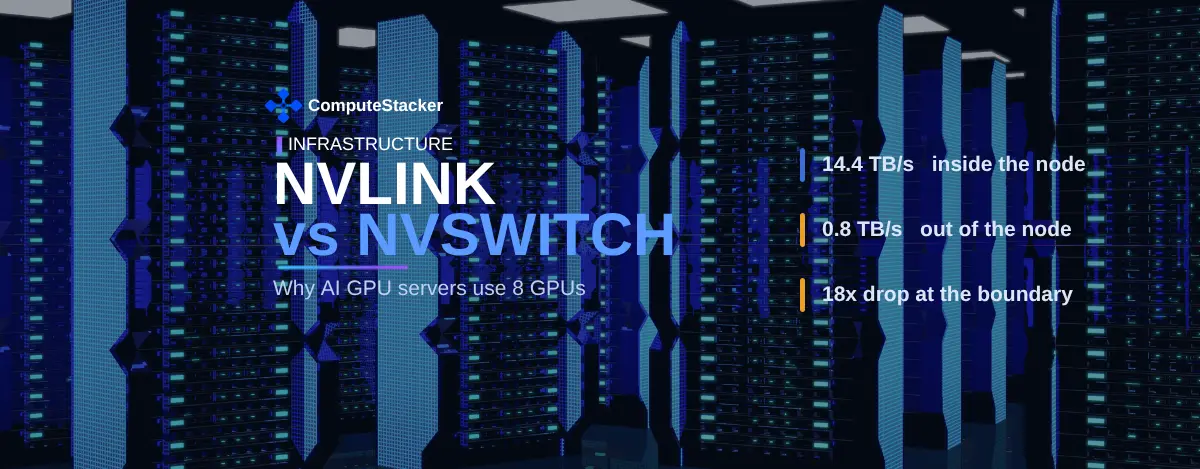
There is only one figure that controls everything else. On a node with eight GPUs, the GPUs transfer 14.4 TB/s between themselves. Between nodes, they transfer 0.8 TB/s.
The AI Compute Threshold Report
We analyzed pricing from 150+ GPU cloud providers to find the exact threshold where an AI startup's OpenAI API bill eclipses the cost of a dedicated H100 cluster.
Read the Full ReportKey takeaways
- NVLink is a connection between the GPUs. NVSwitch is a switching chip that connects a bunch of NVLinks to connect each GPU to all others at full speed.
- Eight GPUs make up one HGX baseboard. NVIDIA designs the baseboard in this fashion. It is not that the interconnect requires eight.
- An HGX B200 node offers 14.4 TB/s for total NVLink bandwidth and 0.8 TB/s for networking. This is an 18-fold decrease at the node boundary.
- This reduction is the reason why 16-GPU applications are harder to engineer compared to 8-GPU ones.
- NVIDIA has two NVLink domains: 8 and 72. NVL72 extends the boundary, but at a cost.
Three ways a GPU talks to another GPU
All GPU-to-GPU communication happens along one of three paths. They vary by an order of magnitude.
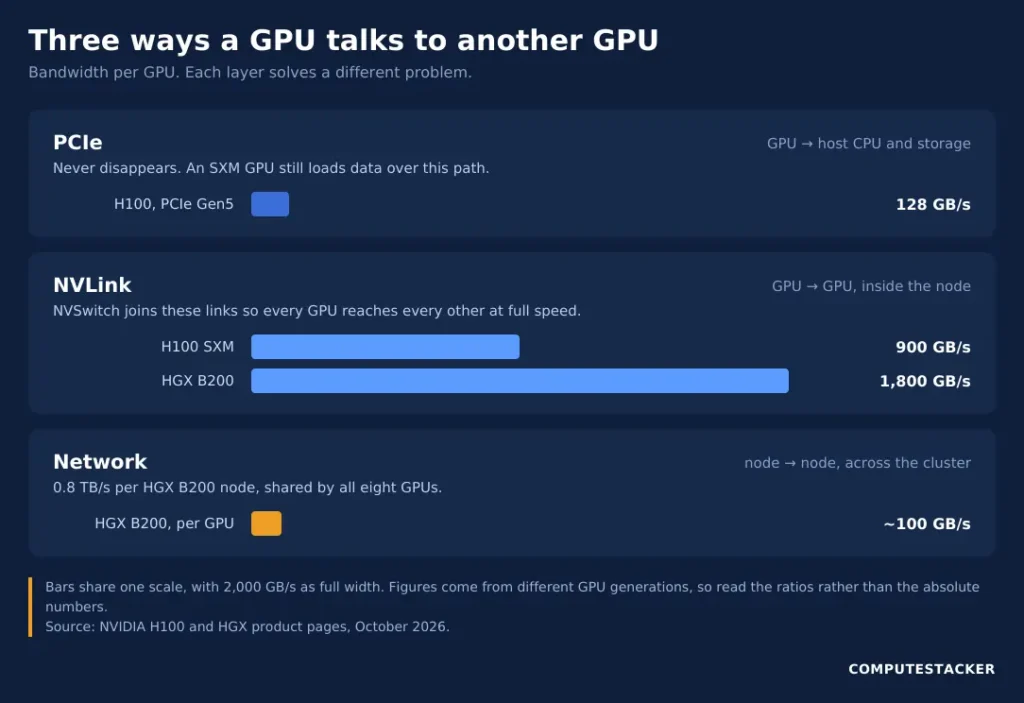
PCIe provides a connection between the GPU and the host machine. According to the H100 datasheet, it amounts to 128 GB/s for all the variants of the H100 on the page.
NVLink provides a connection between the GPU and another GPU. According to the same datasheet, it provides the H100 SXM module with 900 GB/s of NVLink bandwidth. This is 7 times greater than PCIe on the same page.
The network provides a connection between the server and the next server. According to the NVIDIA HGX specification, it provides HGX B200 with 0.8 TB/s of network bandwidth.
Putting things into perspective becomes clearer. Eight B200 GPUs use 0.8 TB/s, thus having 100 GB/s to the outside world per GPU. Its NVLink to the neighbouring GPU within the chassis is 18 times wider.
This comparison involves different generations, so the ratio is the point here.
NVLink vs NVSwitch: the difference
NVLink is a link. NVSwitch is a switch. And there is your entire topic right there.
A link connects two endpoints. To connect eight GPUs such that each connects to all the others, you require 28 links. Each GPU uses up 7 ports to connect to its neighbours.
The NVSwitch eliminates the problem just as an Ethernet switch does in an office. Each GPU sends its NVLinks to the switch, which then routes packets between all pairs.
NVIDIA explains the NVLink Switch as bundling multiple NVLinks together in order for all GPUs to communicate at maximum NVLink speeds. This makes all connections equal in terms of distance.
The property becomes important instead of bandwidth alone. A stage of the training process when gradients are collected from all eight GPUs takes place as fast as the slowest pair of GPUs does. The uniformity of the distance eliminates the slowest pair.
Add up the connections and understand why the change was necessary. Eight GPUs connected directly require 28 connections, while sixteen will need 120 connections. Switches help to linearise the curve.
That is another explanation why the two terms are not synonymous. A computer may have NVLink without an NVSwitch, like the two PCIe cards connected to each other. It cannot provide all-to-all access without the switch.
Why eight is the common configuration
As the HGX platform website at NVIDIA describes, the product comes as a single baseboard with eight Rubin, Blackwell, or Blackwell Ultra SXMs. Eight is the board.
Be clear about what this means. HGX comes in eights; hence servers designed for HGX come in eights. NVLink doesn’t require eight GPUs.
There are lots of others. PCIe cards couple with NVLinks, and Grace Blackwell modules couple GPUs with CPUs. NVL72 couples 72 GPUs into one domain.
It is platform design that creates the need for eight, rather than any restriction within the interconnect itself. Providers sell entire baseboards since they come from NVIDIA in that form. That is the reason why acquiring a full node requires some planning.
What changes at the node boundary
This is the number that makes the entire issue revolve around itself.
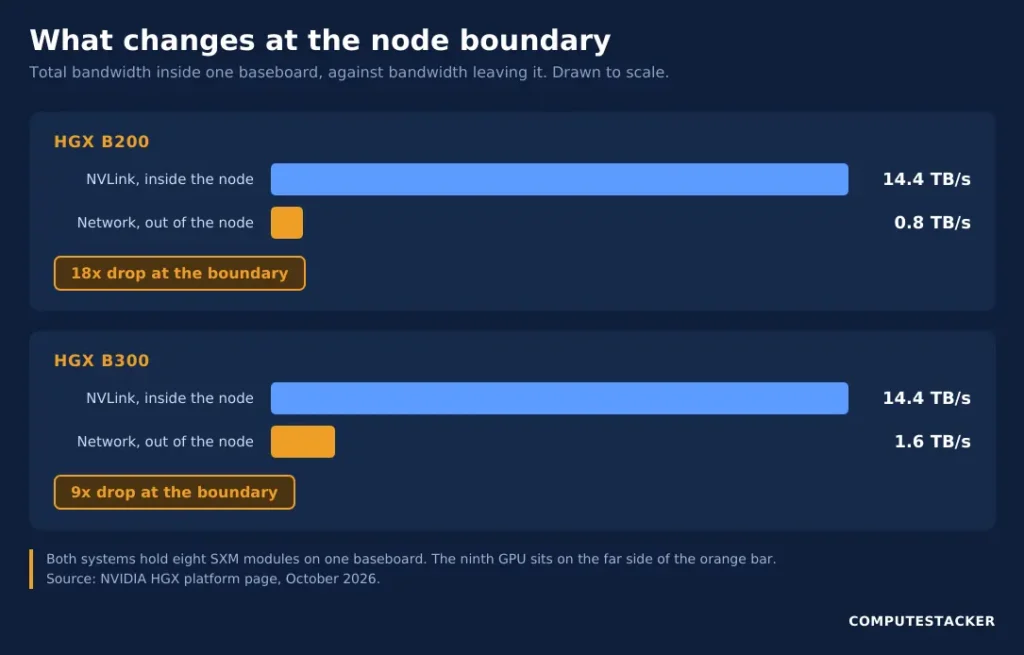
An HGX B200 system provides each GPU with 1.8 TB/s of NVLink bandwidth. That results in 14.4 TB/s in total for eight GPUs. The same spec table gives 0.8 TB/s for networking bandwidth.
In-box: 14.4 TB/s. Out-of-box: 0.8 TB/s. A decrease by a factor of 18 from the same vendor’s table.
HGX B300 demonstrates the same pattern, but with higher figures. So, NVIDIA provides 14.4 TB/s of NVLink compared to 1.6 TB/s of networking, resulting in a smaller decrease, yet still by a factor of 9. This is still a cliff.
You feel the cliff immediately when you need a ninth GPU.
The same logic goes for the memory capacity. NVIDIA provides 1.4 TB of total memory in the HGX B200 system, which means 175 GB per GPU on average. All data within this pool enjoys higher bandwidth.
Adding a ninth GPU does not increase the size of the pool. It creates another pool with much lower bandwidth access.
NVLink, PCIe and the network are three different layers
The confusion between these two is constant. They are located at different levels and solve different issues.
| Layer | What it connects | Example bandwidth | Reach |
|---|---|---|---|
| PCIe | GPU to host CPU and storage | 128 GB/s, H100 PCIe Gen5 | One server |
| NVLink | GPU directly to GPU | 900 GB/s per GPU, H100 SXM | One NVLink domain |
| NVSwitch | Many NVLinks to each other | 14.4 TB/s total, HGX B200 | One NVLink domain |
| Network | Server to server | 0.8 TB/s per node, HGX B200 | The whole cluster |
There are two tricks hidden in that table.
First, PCIe does not go away. Regardless of the gigabits per second of NVLink in an SXM GPU, the PCIe interface links it to the CPU and the storage. The data loading goes through it, not through the NVLink interface.
Second, the form factor makes a difference in the NVLink speed. The NVLink speed of the H100 NVL is 600 GB/s compared to 900 GB/s for the SXM version.
When this actually matters
The node boundary becomes an important consideration for some tasks and not for others. Figuring out which is important from a cost perspective.
Tensor parallelism distributes one layer across the GPUs. All passes through that layer require exchanging activations between them. This communication requires NVLink, so tensor parallelism usually happens within a single node.
Pipeline parallelism splits layers into pipeline stages. The system exchanges activations only at the boundaries between the stages. Thus, communication becomes minimal. You can distribute the pipeline stages across nodes without problems.
Data parallelism replicates the whole model across multiple instances, and each instance gets its own data. At each step, the gradients get exchanged between replicas. While the communication amount is large, it occurs only once at each step.
In practice, most cases use all three methods.
An approximation illustrates why the pool size is important. The 70B-parameter model running at FP16 requires around 140 GB worth of memory for weight storage. This can fit into the part allocated to the B200 GPU in the pool.
At larger sizes, things look different. A 405B-parameter model running at FP16 requires approximately 810 GB worth of memory for weight storage. Even at that point, it can fit within one 1.4 TB node, leaving some space for the KV cache.
Exceeding 1.4 TB implies distribution across several nodes. Our sizing guide does this correctly.
The process differs even more for inference. A model that can fit on one GPU does not use NVLink at all.
Double-check this before ordering an SXM node. Our guide to choosing a GPU for inference does this calculation right.
Quite a bit is decided by software. Your framework, your batch size and your parallelisation approach make a big difference.
NVL72 moves the boundary rather than removing it
The NVLink page by NVIDIA lists two possible sizes of the GPU domain: 8 and 72.
NVL72 can connect 72 GPUs in an all-to-all architecture, as NVIDIA explains, which is nine times the number of GPUs in a typical eight-GPU configuration. All 72 GPUs sit in the NVLink domain.
Indeed, a limit exists, but they have shifted it from eight to 72 GPUs, so the job requiring 144 GPUs hits it once again.
This is how we should understand every new interconnect announcement, which shifts the limit but does not delete it.
The price and availability also shift accordingly–rack-scale systems cost more and sell out earlier, as explained in our post about Vera Rubin NVL72.
Just one warning regarding future estimates. The NVIDIA NVLink page mentions sixth-generation NVLink at 3 TB/s per GPU, while the HGX page lists Rubin at 3.6 TB/s. There is no reconciliation provided by NVIDIA between these two numbers, so avoid using them in calculations for the time being.
What to ask before you rent
There are four questions that set apart a helpful quote from an unhelpful one.
Is it SXM or PCIe? SXM includes full NVLink with a baseboard. PCIe is all about cards and bridges at best, as well as lower GPU-to-GPU bandwidth.
That will affect the price and performance equally. Check the H100 vs. B200 spec comparison on that basis.
Is it a full node or a slice? It could be a slice of a baseboard that shares NVLink with some other tenant’s workload.
How are nodes connected to each other? It can be either InfiniBand or high-end Ethernet. Quantity counts more than names.
How many nodes can I have? Two nodes within one rack are better than two nodes in different rooms. Ask about placement rather than count.
But sizing comes first, of course. You’ll need to calculate how many GPUs you require before you go shopping for H100 providers.
FAQ
Does NVLink require eight GPUs?
No. Eight comes from the HGX baseboard, which NVIDIA builds with eight SXM sockets. NVLink works between two GPUs, across 72 of them, and at counts in between.
Is NVLink the same thing as SLI?
No, and the difference is not cosmetic. SLI shared rendering work between consumer graphics cards. NVLink moves data between data-center GPUs so they behave as one larger memory pool.
Does NVSwitch replace InfiniBand?
No. They work at different scales: NVSwitch connects GPUs inside one NVLink domain, while InfiniBand connects nodes across a cluster. A large training run uses both.
Do all H100 servers have NVSwitch?
No. HGX H100 baseboards include NVSwitch, but H100 PCIe deployments do not. Ask the provider rather than assuming, because the SKU decides it.
Does NVLink help when my model fits on one GPU?
Barely. A single-GPU model does its work in local memory and crosses no GPU boundary. You would pay for interconnect you never use.
Conclusion
NVLink is the link between GPUs. NVSwitch is the fabric that makes all of them equal neighbours. Eight is what one HGX baseboard holds.
One figure is worth carrying away. An HGX B200 node runs 14.4 TB/s inside and 0.8 TB/s out. That gap, not the GPU count, is what makes a job cross a line.
Work out your GPU count first, then check whether your parallelism plan needs to stay inside one node. If it does, buy a whole node.
Get personalised, no-commitment quotes from top AI infrastructure providers in under 2 minutes.