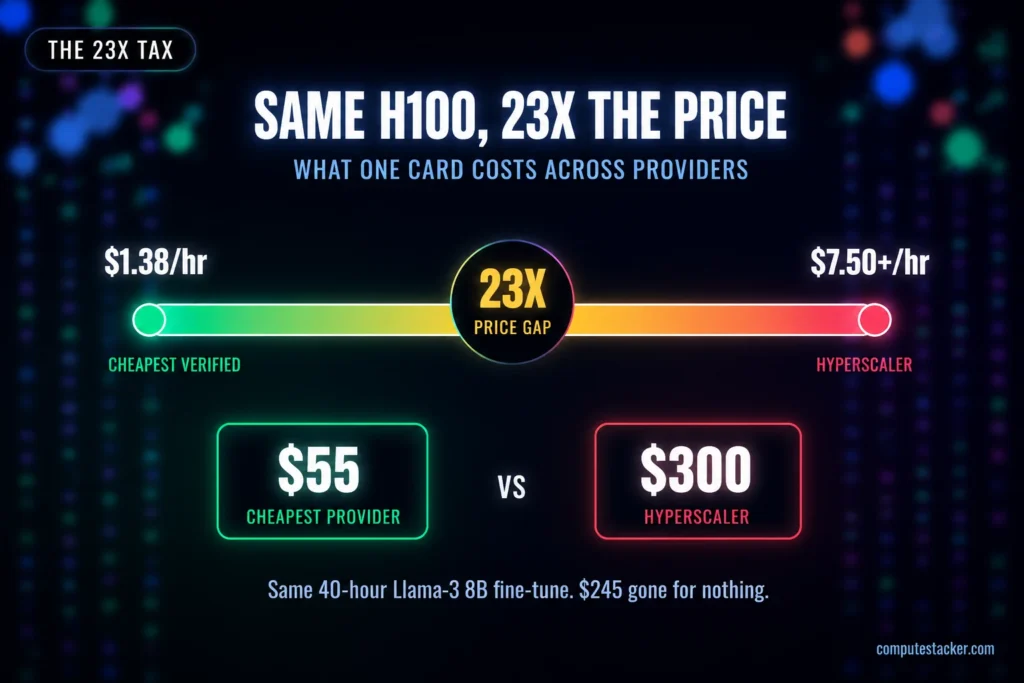
Looking for the best GPU for training LLMs in 2026? Here’s something nobody really tells you about getting a GPU for your LLM. Your choice matters less than how you rent it. I gathered price data from over 150 different companies and found that the same H100 can cost $1.38 per hour in one place and more than $7.50 per hour in another. That’s a 23 times difference for the exact same chip. We call it the 23x tax, and once you notice it, you can’t ignore it. There’s no conflict of interest for me with hardware vendors or cloud providers. I just want to help you pay a fair price.
Before getting to that, training ≠ inference
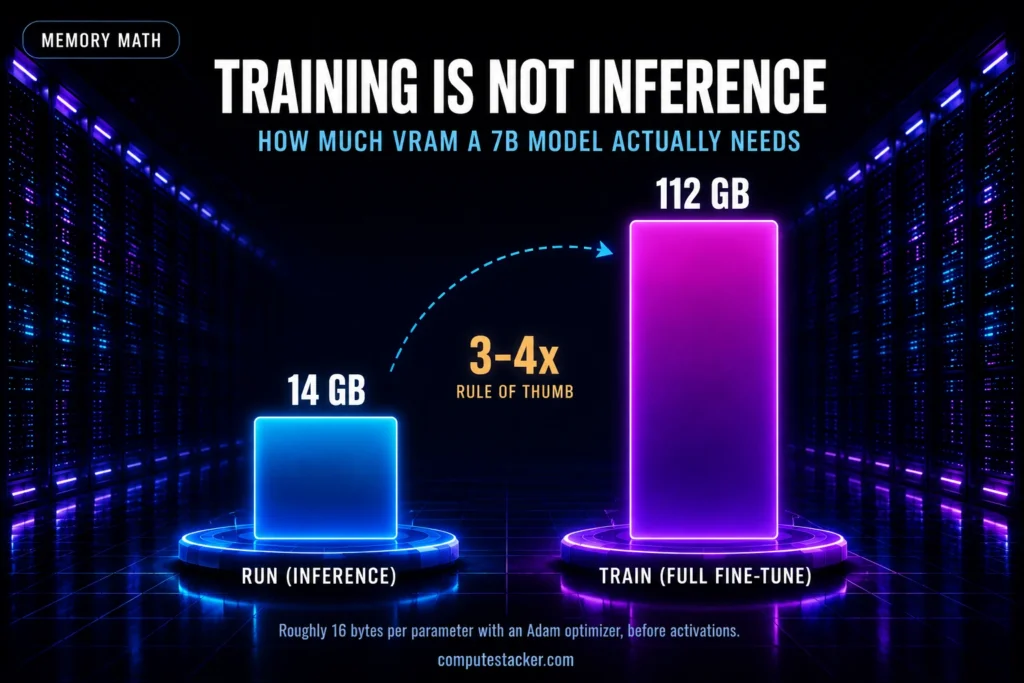
Currently, most “best GPU” lists are actually lists of GPUs for inference. In terms of requirements, inference is very different from training. Compared to inference, training is much more demanding of system resources. For example, the model weights, gradients, and state of the optimizer, as well as all of the outputs from each forward pass must be retained.
- General rule of thumb: ~16 bytes/parameter with Adam optimizer. For a 7B model? ~112GB just for the full fine-tune.
- Plan for roughly 3 to 4 times the memory you’d need just to run the model. That gap is exactly why LoRA and QLoRA took off: they train only a small slice of the model, so your memory needs drop sharply.
- 70B from scratch? That means running an entire node with 8x H100 or H200 GPUs connected via NVLink, or even more. The QLoRA version of that model runs on a single GPU
The top 5 GPUs for training LLMs in 2026
I ranked these by lining up live prices against what each card can really do. Here’s the list.
NVIDIA H100 80GB: The Default Workhorse
- H100 trained pretty much everything the past few years, and in 2026 it remains the top performer.
- 80GB of HBM3, that FP8 Transformer Engine everybody talks about, NVLink for ganging a few together.
- Zero friction as well, it’s assumed by all the frameworks.
- Around 3-5x an A100 for training.
- You’ll pay $1.38 to $7.50 an hour, neoclouds typically $2.99.
- Normal full fine-tune of ~13B parameters, or run on this thing spread out across a node? This is the one.
NVIDIA H200 141GB: The Memory Upgrade
- To be honest, the H200 is simply an H100 with the amount of memory it should have had.
- Same Hopper GPU architecture, same software stack, nothing else to learn.
- Just a much larger memory reservoir: 141GB of HBM3e at 4.8TB/s bandwidth, 75% more.
- Larger mini-batch, longer context length, fewer 3am OOM crashes (been there).
- It plugs into the existing system seamlessly.
- Costs you $2.30 to $14 an hour, typically around $4.
- Buy the moment your model won’t fit into 80GB.
NVIDIA B200 192GB: the frontier pick
- This is the one. Blackwell, frontier territory.
- 192GB of HBM3e, bandwidth unmatched, native FP4 if your stack supports it.
- Pre-training and large fine-tuning? This is the one.
- Drawback – expensive and scarce.
- Prices for the newest silicon have roughly doubled over the past year, and the supplies are constrained.
- Ranging from $3.44 to $16 per hour, or around $6.02 in some neoclouds, $2.12 on spot.
- Want more memory? Go with the B300 – 288GB.
AMD Instinct MI300X 192GB: the value proposition
- The MI300X by AMD is the only viable alternative to NVIDIA right now and normally provides the most affordable option when aiming for high memory capacity.
- 192GB of HBM3, 2.4 times the H100, thus having a complete model running on just one card instead of several.
- But there is software – ROCm rather than CUDA.
- Simple PyTorch is fine, but if you want to use custom kernels, there is the need to re-program.
- More than 80GB in a regular configuration? Pure steal, ranging from $1.71 to $7.86 per hour.
NVIDIA A100 80GB: the economical way in
- The A100 refuses to retire, and for anything short of frontier-scale work it’s often the smartest money you can spend.
- 80GB HBM2e at about 2 TB/s bandwidth.
- Plenty for fine-tuning, LoRA and QLoRA, and smaller full-training runs, and it’s available almost everywhere.
- No FP8 engine and slower than an H100, but cost per finished run often wins on modest jobs.
- Rent for about $0.74 to $2.50 an hour (neoclouds around $1.79).
- Best for fine-tuning, experimentation, and debugging a pipeline before you scale.
| GPU | VRAM | Memory | Best training use | Rental (on-demand) |
| H100 80GB | 80GB | HBM3 | Full fine-tunes, node-scale runs | $1.38–$7.50/hr |
| H200 141GB | 141GB | HBM3e | Bigger batches, longer context | $2.30–$14/hr |
| B200 192GB | 192GB | HBM3e | Pre-training, frontier fine-tuning | $3.44–$16/hr |
| MI300X 192GB | 192GB | HBM3 | High-memory PyTorch training | $1.71–$7.86/hr |
| A100 80GB | 80GB | HBM2e | Fine-tuning, LoRA/QLoRA, small runs | $0.74–$2.50/hr |
Which is the best GPU for training LLMs for you?
It depends on your use case:
The AI Compute Threshold Report
We analyzed pricing from 150+ GPU cloud providers to find the exact threshold where an AI startup's OpenAI API bill eclipses the cost of a dedicated H100 cluster.
Read the Full Report- On a tight budget, or are you just starting out? A100. And if you’re using QLoRA on a 7-8B model then RTX 5090.
- A normal full fine-tuning of up to ~13B? One H100.
- Hit the memory wall? H200. Or MI300X if you’re using standard PyTorch.
- Actually pre-train a model of decent size? B200, and B300 if you need to go all the way.
Do not rent the wrong GPU (I see these mistakes all the time)
- Size according to inference, not training. This 40GB number you’ve found is for inference purposes. Training requires 3-4 times as much.
- To buy, not to rent. A purchased H100 setup breaks even only after 18+ months of continuous usage, and no one uses them like this.
- To compare the prices of the same card across different providers. It can be up to 23x more expensive!
- Acquiring the latest and greatest GPU card without any justification. For example, H100 or A100 will be always cheaper than a B200 that you cannot utilize fully.
- Neglecting if it is in stock. Even the cheapest listing on the site does not mean much if the item is sold out.
- Failing to use spot and reserved pricing. Spot pricing can bring down your bills by 50-80%, while reserved can save you 20-40%.
- Omitting the little extras. Egress (it can go up to $0.12/GB) and storage are not to be overlooked.
How to properly compare different cloud providers
After picking the card, there is more to comparing providers than just looking at the prices:
• The actual cost per GPU. Some providers will sell nodes only with 8 GPUs, so remember to divide the price accordingly.
• Availability. Do you have access to it right away or have to wait in line?
• Interconnect type. NVLink in case of multi-GPU and InfiniBand in case of multi-node.
• The hidden fees. Egress, storage and other peculiarities of billing.
• Regional pricing and support. Depending on the region pricing may vary up to 15-25%.
Don’t pay the 23x tax anymore.
Example: a 40-hour fine-tune of Llama-3 8B on one H100. The cheapest verified supplier is about $55. The hyperscaler would charge around $300. The same outcome, but you have wasted $245. ComputeStacker compares real-time pricing from over 150 suppliers and shows available inventory.The best GPU for training LLMs is only half the equation as in where you rent it decides the bill.
Compare GPU prices → Get free quotes in under 2 minutes →
For most people, the H100. Step up to an H200 or B200 for more memory or scale, down to an A100 for fine-tuning.
~16 bytes per parameter for Adam, so a 7B model needs ~112GB for a full fine-tune. Roughly 3-4x what inference needs. LoRA and QLoRA cut it way down.
From scratch, a full node, usually 8x H100 or H200 on NVLink. A QLoRA fine-tune fits on one card though.
H100 if it fits in 80GB. H200 when you need the extra room for bigger batches or longer context.
Rent, pretty much always. Buying only breaks even after 18+ months of nonstop use
Get personalised, no-commitment quotes from top AI infrastructure providers in under 2 minutes.